

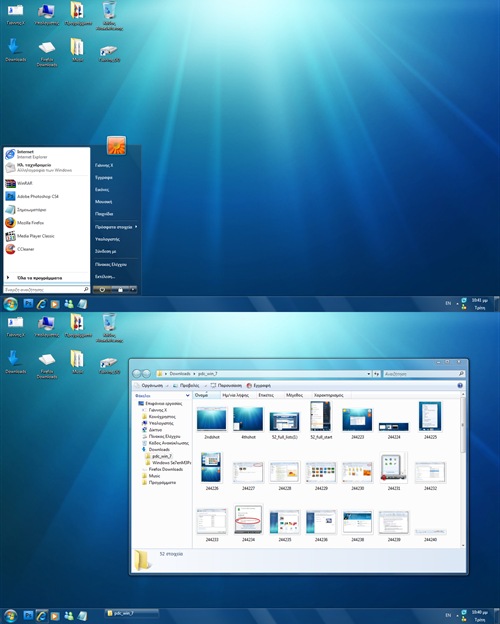
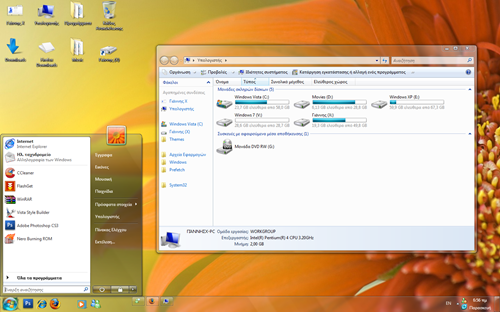
Windows 7 which was demoed at PDC, has some theme change in the form of taskbar and start menu. If you liked the Windows 7 theme and like to try it out on Vista, you can do it by downloading the theme for Vista made by Deviantart user DJ Gx. He has created two themes based on Windows 7 for Vista.








i have downloaded the windows 7 theme for my vista but i don’t know how to install . Pls help me.
it will be very easy if you have tune up utilities (apply with tune up styler)
Looks Nice, will try this.
I have download and I have moved the Windows 7 folder to my theme folder but I can not choose the Windows 7 theme when I go into my Display options. Has anyone got this to work for them? If so can you write up how you did it.
Thanks
Bonjour a vous internaute moi je dispose actuellement de windows vista basic alors aurais je la transparence si je met ce theme
i cant apply my vista aero theme i dont have it in my themes window and all the windows are on windows classic so wut can i do now
Hey …….. I also have the same problem. I have download and I have moved the Windows 7 folder to my theme folder “C:\WINDOWS\Resources\Themes” but I can not choose the Windows 7 theme when I go into my Display options.
download 7 zip, open archives and go to theme and choose the theme file and drag it to a folder, go on personalize and choose the file, and your done
You need to right-click on the desktop and go to properties; there you’ll find themes; click on browse and select the *.theme file . thats it; after that you could choose a nice win 7 wallpaper and thats it ! =)
ya i have that problem and i dont got the areo theme i dont get that can any 1 help?
I browsed the .thm file when right clicked but it did just happen as for abhisheak to me, how do i do!?!?
windows 7 sucks.. too many error problem, too slow loading..
Okay, hold on there. First of all, you must download VistaGlazz and patch your system files. Make sure you have recovered them in your hard drive before doing this action. When patching progress is completed, you just copy the current theme’s folder (Windows 7 specifically) at your Windows Themes folder. Now, it should be visible and available for using.
For further help, don’t hesitate to leave a reply.
does it do all the cool effects like the real windows 7
Try downloading the Windows 7 Beta Themes from Microsoft! They work ….
Hi there! This theme looks great! Had one on my old win XP and I would like to apply it to my new Vista but I have encountered some problems.
I’ve downloaded VistaGlazz and patched my system. After that I did a reboot. Then I’ve copied the “theme” folder in C:Windows\Resources\Themes and I still can’t pick this theme from the “theme” menu…
Any suggestions?
You need click on top where you see two aero themes.
he all..try use tuneup utilities..its the best software and more safety..u can change ur theme, logOn or startup logo without changing system files..try it!!!
I have downloaded the Windows 7 Theme.
I Have patched my files with VistaGlazz
I have copy and pasted the Windows 7 Folder to C:\Windows\Resources\Themes
I have clicked on the Windows 7 theme every way imaginable
IT WONT WORK WHAT IT THE PROBLEM
PLEASE HELP ME
[email protected]
wow thanks a lot… em the is any win 7 theme for vista that i can download from you? (n.n)
To install windows 7 theme on ur cp and use it is quite simple Just install Tune Up ulitilities and u will see
wow wow wow! the themes is so fantastic….. but how can i download and install it on my vista?
does it work in vista starter???
tried it, only the task bar looks like vista…
The Taskbar still looks like vista
ey wont work on explorer.exe
i tried the takeowner but i cant
“doesn’t exist”
Windows 7 art?k güncelleme almayacakm??. Do?ru mu?