

Many times when we paste contents from other documents or programs to Word, the formatting in the open document is lost and the contents copied from other sources will have the default formatting. So after pasting contents from other sources or document, we have to format it again and this becomes a tedious job many times. You can set Word to take the formatting of the current document while pasting contents from other sources.
To set this option, click the Office button on the top left corner and select word Options.
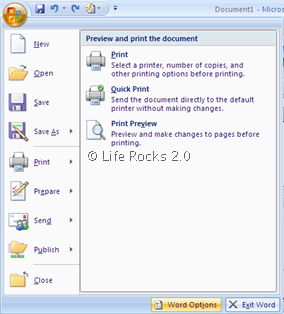
Select the Advanced tab in the Word options and scroll down to cup, Copy and Paste section.
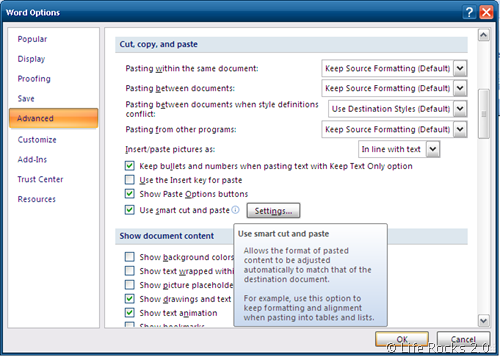
Here you can select which formatting to use by default when copy/pasting contents from other documents or programs. You can also enable the Smart Cut and paste which automatically matches the formatting of the destination document.







It did not work for me. the bullets are still all left jsutified.
2
1
a
b
c becomes
2
1
a
b
c
the forum does not have the capacity to show formatting?
2
..1
….a
…..b
I always had this problem. Thanks for the tips, it helped me a lot. I spent much time re-formating after the unsucessfull copy and paste. Also, I am using a tool to copy and paste easier, so with one CTRL + C plus click on (MS Word, Excel, Outlook, etc..). This way the copy and paste works with one click. This website has more information about how it works http://www.clicktoapp.com.
I’ve tried everything. Something has changed my clipboard such that when copying and pasting all formatting is lost, regardless of the options selected under the Word Advance tab.
I am having the same issue lately. Did you find a fix?
I have exactly the same problem with one of my three computers. Around the same time my todo bar in outlook went mad too. I guess it is related with the latest updates by Microsoft.
You might find, as I did, to my GREAT irritation, that even though you do all the things mentioned above, Word will still lose formatting when cutting and pasting between documents and especially between Office apps. It doesn’t seem to care if you remove the whole Office suite, Detect and Repair, etc. etc. If this has happened to you, don’t worry! Help is at hand.
There are lots of work arounds, like going into your registry and deleting the ‘Data’ folder you’ll find there for Word. However, these all seem to bounce the problem right back at you after a few cuts and pastes.
The only thing i have found that works is to start MS Word in Safe Mode. If you don’t know how to do this, go to Start, MS Office, Word. Then, as you click on Word, hold down the CTRL key. It will prompt you to start in Safe mode, and you click Yes. Cue fanfare of trumpets as you merrily retain formatting from Word to Outlook to Excel with ease!
The reason why this works is most likely because at some stage I downloaded something somewhere that stuck some kind of add on or plug into Word and it got all confused. Safe Mode disables all that junk and allows you to carry on.
If I was a teccie, I’d know how to disable all the add ons but I don’t!
If this doesn’t work for you, only the great gods in the skyk can. MS is clueless and useless and even MS certified MVPs tell you ‘It’s Word, it’s querky!’. How helpful.
The only other thing I strongly recommend you do is remove IE from your system. That horrible program probably started all this. Love Firefox with all my heart now!
Article writing is also a fun, if you know afterward you can write otherwise it is complex to write.