

Some softwares and games might be build for Windows XP and might crash when executed in Vista. If softwares are crashing in Vista, you can fix it with a simple and quick solution. To run programs having compatibility issues in Vista, turn on the compatibility Mode. With compatibility mode, you can run the program or game in the settings for which it was actually designed.
To run any program or game in compatibility mode, right click on the executable file or the start menu item for this program and then select Properties. In the properties Window, select the Compatibility tab.
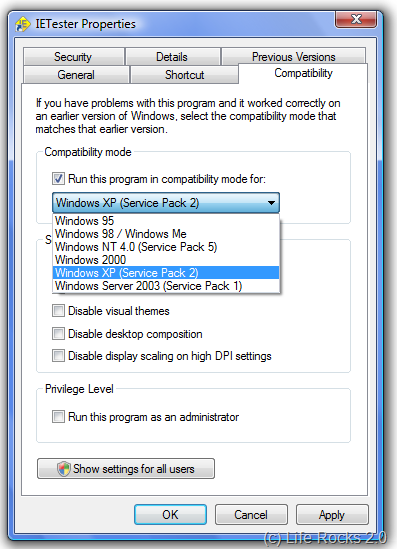
Here check the box against “Run this Program in compatibility mode for” and then select the Operating system for which it was initially designed. Click apply and now your program would work in Vista using the compatibility settings for its originally intended OS.
In most of the times, this fix would work, but there could be some cases where the program is too old or outdated.





Thanks for the tip! I was having trouble running KOTOR on Vista and this solved the situation.
Many blessings,
Art Gonzalez
Check my Squidoo Lens at: Quantum Knights
Yeah, unfortunately, I have yet to see this work. I tried to get the last version of Compuserve to work on Vista, but could not with this fix. I’m sure it has worked in the past though.
Nirmal, the same option is also available in XP, for using programs available for earlier versions of Windows.Really helpful option and can be accessed similar to Vista as you mentioned.
@Avinash,
Yea its available in XP as well, you can make programs intended for Windows 98 work in XP the same way.