

There might be some instances where you wanted to sent a webpage as email, but attaching it to the mail might not be a good solution. In this case you can open the webpage in Outlook and then sent it as an email directly from Outlook. The advantage of using this method is that the webpage is not sent as an attachment, instead the contents are directly pasted into the mail.
To open any webpage in Outlook, select View-> Toolbars-> Web
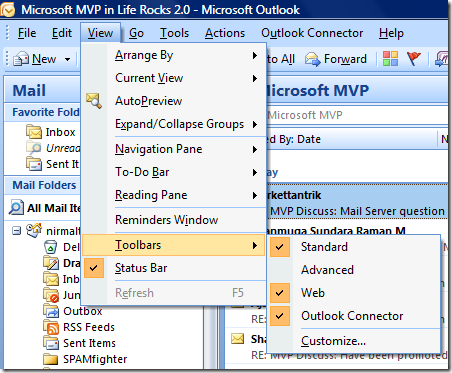
Using Search web feature, enter the URL and the website opens inside Outlook.
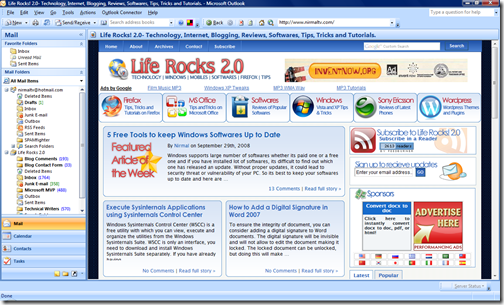
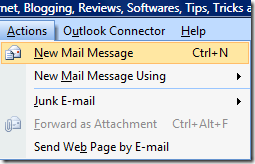
If you want to sent this page as email, then select Actions-> New Mail Message or CTRL +N.
The email sent will have all the contents in the page. This is helpful in sharing websites in a network or to your friends.






nirmal this is really a wonderful tip
now i can share web pages directly with my friends
It sounds like it’s sleeting, but every time I turn on the outside light & look, nothings happening.
Hola!
Tengo un problema: sigo todos los pasos y fenomenal, hasta que llego a crear nuevo correo y me aparece el correo vacío, sin la web que quiero enviar, y no encuentro manera de enviarla.
Gracias.
This is a great tip .. however Outlook seems to want to enlarge all the images on the web page before sending it… anyone know a solution?
Currently I have to go to click on every image in the website – go to Picture Tools – and reset the image…
Hey, it was a lot more fun if it could send the webpage’s flash contents. any ideia on how to make that work ?
Surf Town offers many possible surfing experiences for beginners, experienced,advanced, young or old.
Discover surfing in the South of Morocco in the best of security with our qualified surf instructors.
its a good page here I am going to install it now
This did not work for me … it opened a new email message but the web page is in the email
This did not work for me either. I opened a new mail message as directed above and the website was not there. It was just a blank e-mail.
Any suggestions? I had the same problem as the previous 2 messages. I went to actions and new email but it just sent a blank email, not the website that I chosen.
The last part of the instructions is wrong, you must click Actions and then select send web site in email (or words to that effect at the bottom)
Still doesn’t help as it looses its format – why can’t outlook work as well as through mac programs such as safari?
Thank You Andy, just what I needed!
The loss of formatting has to do with the mail clients not accepting all the CSS, check out the link below for details covering the major email clients and web-based mail:
http://www.campaignmonitor.com/css/
hi zola seven
i would like to keep in touch with you. there are some issues that need your very special attention
Doesn’t work great in Office 2007
Same as above but “Actions -> Send Web” Page By e-mail and definitely not Ctr + N !!
unable to send webpage as email from outlook 2007. the only way is “send page as email” option then the format and layout changes. What can I do. Thanks
Thank you, Nirmal.
This tutorial has saved me heaps of bandwidth. Will be using this for emailing out newsletters. Thank you so very much.
This doesn’t work. When I select Actions-> New Mail Message, all it brings up is a blank Email note; no webpage. What am I missing?
I agree with Brent Johnson, same thing here.
Thank you very much for sharing this post is very usefull information