

Smart Shutdown is a free utility for Windows which can shut down, log off, reboot, lock, turn off, hibernate, disconnect from the Internet or network, enter standby mode in Windows, shut down and reboot computers in your network, both manually and automatically. Smart Shutdown is in fact a powerful utility which has lots of options for shutdown. Unlike normal shutdown programs, Smart Shutdown has more options like emptying of recycler bin, ejecting removable media, displaying a warning message, etc.
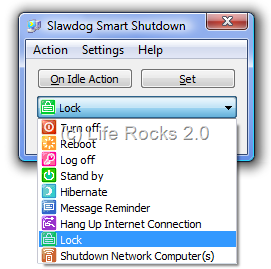
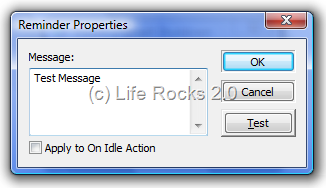
Apart from the Shutdown/Restart options, the utility also has the feature of adding custom warning or message using the reminder option. You can also password protect the program so that the options cannot be changed.
Its built-in Smart Shutdown technology can shut down your computer if you are inactive for the specified period. Moreover, with Easy Shutdown technology, you can shut down your computer with just a single click. One of the other features includes command line support.
Features of Smart Shutdown
- Turn off, log off, reboot, lock, power off, hibernate, disconnect from the internet/network and go to stand by mode.
- Shut down and reboot network computers.
- Set message reminders.
- Execute actions manually or automatically.
- Choose between two types of setting events time in automatic mode: after some period of time or at a specific time
- Stop the countdown and start it again.
- Shutdown, reboot etc. with just one click
- Schedule everyday shutdowns
- Display warning message before shutdown, reboot etc.
- Play a sound or sound file before shutdown, reboot etc.
- Cancel the shutdown process just by pressing a button on the warning message box.
- Empty the Recycle bin on shutdown, reboot etc.
- Control the program and execute actions using only the system tray.
- Eject any of your removable media on shutdown, reboot etc.
- Password protect all shutdown commands and program options
- Run the program in “silent” mode
- Disable/enable windows shutdown commands in Windows Start menu
- Program actions to be executed even if no user is logged on







