

Startup Monitor is a freeware application which will monitor program installations on Windows and informs you when a program adds itself to the Window startup. This program once installed sits in the taskbar and notifies you when any program registers itself to run at system startup. It prevents annoying programs from registering themselves behind your back.
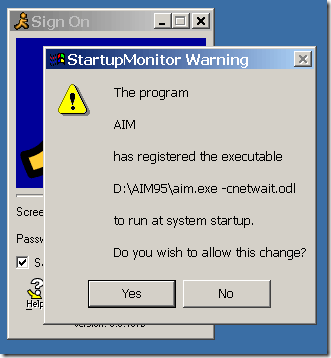
As shown in the image, whenever a program tries to add itself to startup, then you can manually select whether you want to add it. StartupMonitor does not require Startup Control Panel, but it complements it nicely. When you choose not to allow a program to register itself, the program’s entry becomes disabled in Startup Control Panel, so you can go back and enable it later if necessary. StartupMonitor watches the Start Menu’s Startup folders and the Run entries in the registry.
StartupMonitor will load automatically with Windows. It runs completely transparently until a program registers itself to run at startup, when it will show a message box like the one above.
If you want to stop StartupMonitor from monitoring, select Stop StartupMonitor shortcut in the start menu.








Nice tool, I use spyware sweeper though which does this for me, so don’t think will need this right now 🙂