How to Add or Edit Tags for Multiple Photos Quickly in Vista

Advertisements

There are lots of freeware application including Microsoft Pro Photos tools to edit meta information of photos. You can also add or edit tags, author details, rating, title and subject in Vista easily and quickly. This can be done for a single photo or multiple photos. To add the photo details select a photo and you can see the details at the bottom of the explorer window.


Meta Data

Meta deta

You can add details against Tags, Title, Comments, Author and also Subject. Once you add/edit the details, you can save the details by clicking the save button.

Edit Tags

This can be done for multiple photos as well, all you need is to select all the photo and click the Show more details link and do the same process.
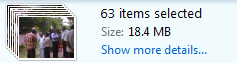
Edit Multiple images

Now all your photos will have the same details.


Tags: , , , , , ,
 

Share this Post

stumbleupon-48�48.png digg-48�48.png technorati-48�48.png feeds-48�48.png delicious-48�48.png


Comments

Trackbacks

There are no trackbacks


Add a comment

Translate Page

Translate to EnglishÜbersetzen Sie zum Deutsch/GermanПереведите к русскому/RussianΜεταφράστε στα ελληνικά/GreekVertaal aan het Nederlands/Dutchترجمة الى العربية/Arabic中文翻译/Chinese Traditional
中文翻译/Chinese Simplified한국어에게 번역하십시오/Korean日本語に翻訳しなさい /JapaneseTraduza ao Português/PortugueseTraduca ad Italiano/ItalianTraduisez au Français/FrenchTraduzca al Español/Spanish
Nirmal is a Software Engineer and Technology Blogger. He is a Microsoft Most Valuable Professional in Windows Desktop Experience.
mvp   India Technology Bloggers  

More Articles

Sony Ericsson Phone releases and reviews
Top Tutorials
Freeware for Windows XP/Vista
Personal Blog
India Blog
The Mobile Blog