

Apple iPhone is in news ever since it has become cheap (not in India). The interface of iPhone is claimed to be one of the best in the class. You can customize the looks of iPhone with themes and you have the option of creating iphone themes for free using 3 simple steps. Navigate to the site iPhoneThemeMaker.com and you can create your own themes in 3 steps.
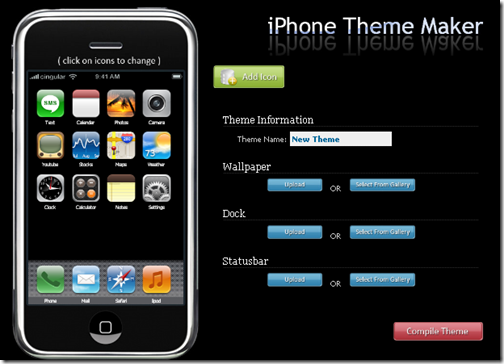
- First you need to provide a background image for the theme, this can be either uploaded one or selected from the gallery.
- Now select a dock image either from gallery or you can upload the image.
- Finally select the status bar for the theme.
You can select/change the icons being displayed on the screen, by clicking them. There is also provision to add a new icon to theme or change the existing icons available on the screen. Once you are done with the changes, click on compile theme button and theme will be generated.
Once the theme is created, you will be provided with a download link and also a theme key in case you want to edit the theme using the website.








And for those who cannot afford iPhone due to the price (including me 🙂 ), you can install the iPhone theme for Windows Mobile to make your mobile phone display then looks much more like that of the iPhone.
Thanks…
My community:
http://toostep.com/apple_iphone_3G_lovers_mobile_community_phones_india
Very nice explanation! Thanks for sharing & keep up the good work 🙂
I know http://www.iPhoneThemeGenerator.com and it is simpler