
Insert Thumbnails of URLs in Windows Live Writer with Websnapr

Advertisements

Websnapr is a Windows Live Writer plug-in which allows you to add a thumbnail of any website directly into your blog. It is a simple plugin for the Windows Live Writer blogging tool that adds an “Insert Thumbnail of Url” option. This plugin enables you to use the WebSnapr service to quickly embed a thumbnail image of any website. Next time you want to add a thumbnail of any website, you can try this service.
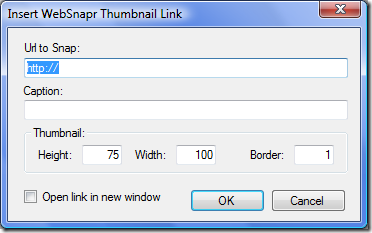
Websnapr

It allows you to choose the size of image as well as adding a border and you can also select the website to open in new window. To install the plugin, first download it and then extract to C:\Program Files\Windows Live Writer\Plugins\ folder and restart Windows Live Writer.

Download Windows Live Writer Websnapr Plugin


Tags: , ,
 

Share this Post

stumbleupon-48�48.png digg-48�48.png technorati-48�48.png feeds-48�48.png delicious-48�48.png


Comments

Trackbacks

There are no trackbacks


Add a comment

Translate Page

Translate to EnglishÜbersetzen Sie zum Deutsch/GermanПереведите к русскому/RussianΜεταφράστε στα ελληνικά/GreekVertaal aan het Nederlands/Dutchترجمة الى العربية/Arabic中文翻译/Chinese Traditional
中文翻译/Chinese Simplified한국어에게 번역하십시오/Korean日本語に翻訳しなさい /JapaneseTraduza ao Português/PortugueseTraduca ad Italiano/ItalianTraduisez au Français/FrenchTraduzca al Español/Spanish
Nirmal is a Software Engineer and Technology Blogger. He is a Microsoft Most Valuable Professional in Windows Desktop Experience.
mvp   India Technology Bloggers  

More Articles

Sony Ericsson Phone releases and reviews
Top Tutorials
Freeware for Windows XP/Vista
Personal Blog





