
How to Disable Task Manager on Windows Vista

Advertisements

There are many instances when we like to disable Task Manager especially if you share your PC with others. Once task manager is disabled users will not be able to kill processes or services using the Task Manager. Task Manager can be disabled from the Group Policy editor. This option is available only in Vista Enterprise and Ultimate versions.

1. To disable task manager open Group Policy Editor (Start-> Run-> gpedit.msc)
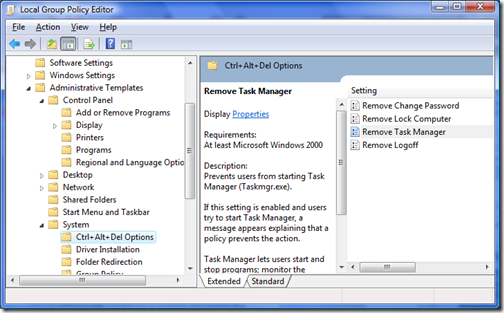
Group Policy Editor

2. Navigate to User Configuration-> Administrative Templates-> System-> Ctrl+Alt+Del Options. Double click on the “Remove Task Manager”.
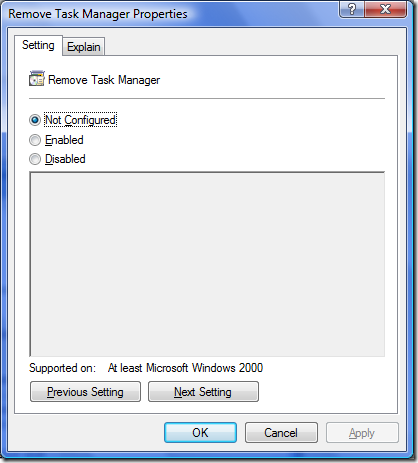
Task Manager Disable

Once it is enabled and users tries it access it then a message comes informing that policy prevents the action. This will prevent users to monitor tasks and services running in the system.

Tags: , , , , , ,
 

Share this Post

stumbleupon-48�48.png digg-48�48.png technorati-48�48.png feeds-48�48.png delicious-48�48.png


Add a comment

Translate Page

Translate to EnglishÜbersetzen Sie zum Deutsch/GermanПереведите к русскому/RussianΜεταφράστε στα ελληνικά/GreekVertaal aan het Nederlands/Dutchترجمة الى العربية/Arabic中文翻译/Chinese Traditional
中文翻译/Chinese Simplified한국어에게 번역하십시오/Korean日本語に翻訳しなさい /JapaneseTraduza ao Português/PortugueseTraduca ad Italiano/ItalianTraduisez au Français/FrenchTraduzca al Español/Spanish
Nirmal is a Software Engineer and Technology Blogger. He is a Microsoft Most Valuable Professional in Windows Desktop Experience.
mvp   India Technology Bloggers  

More Articles

Sony Ericsson Phone releases and reviews
Top Tutorials
Freeware for Windows XP/Vista
Personal Blog
