

Each file extension in Windows is associated to a program and when you open the file, its set to open with the default program for that particular extension. You can set/change the association of each extension with any program manually. To do this Open Control Panel and select “Make a file type always open in a specific program” option under Default Programs.

Here you can see the list of all extensions and the associated programs on the right.
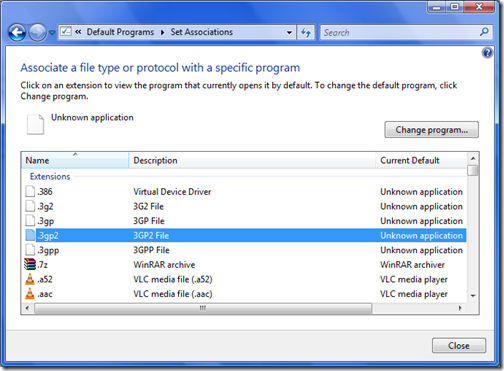
If you need to change or set the default program, select the extension and click Change Program button located on the top right corner.
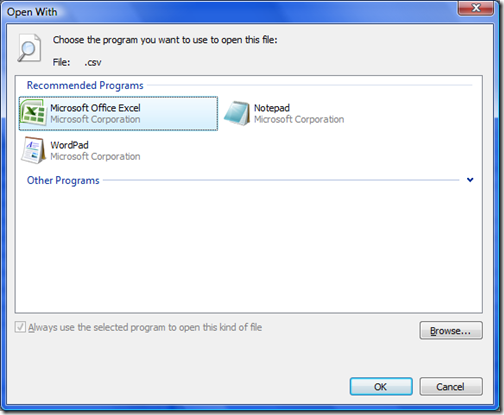
Here the recommended programs and also the other programs are displayed. Once you select a program, the file will be associated with that program. Alternatively if you need to change only for a particular file, right click on the file and select Properties-> General Tab and select the Change button.
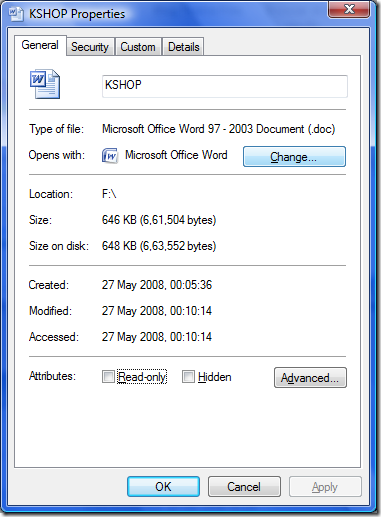
Once you are selected the program, click OK.





nice little tips you share on your blog, and this one is really helpful 🙂
How do i get the program opener to default because i accidentally set it to something i don’t want some of the files…
Hi I have Windows Vista program. When someone sends me an attachment through my hotmail and I have to open it. It takes me automatically each time to itunes. How do I get itunes to stop doing that so I can open the right attachments. If you can walk me through this I would greatly appreciate it.
Thanks in advance
Karen
In response to, “How do I set the program opener to default?”, first you want to set the default program of the file as a program your not going to need. After you set that, go and delete that program. Now that files open with program should be set back to the default setting, (unknown program).
I hate the way file associations are handled in Vista and Windows 7
http://www.nirsoft.net/utils/file_types_manager.html
That free utility makes life a lot simpler.