

Most of the Laptop or Notebooks does not have an option to manually turn off the LCD screen. Turning off the LCD screen will save power and it make sense to turn off monitor in case you are downloading files overnight. Windows has an option to turn off monitor when kept unused for some time, but this feature is not always good. Turn Off LCD is a simple freeware application which will allow you to turn off your notebook screen saving some electricity.
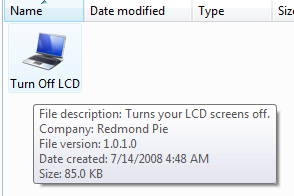
All you need is to download and run the file and no installation is required. The file is only 89kb in size. You can add a shortcut to this application in desktop or quick launch.
According to the owner of the application, its coded in C# using Microsoft Visual Studio 2008. Its basically a simple console based application that makes use of a dynamic link library (User32.dll) file from Windows using System.Runtime.InteropServices namespace and then calls the required function.
This application works in Windows Vista as well.
Download Turn Off LCD [ Via Raymond








Thank you Nirmal.
Actually i was searching for this ..
Nirmal,
This freeware will be very helpful. I always use the ‘Power Options’ from control panel to setup my monitor, hard disk activity accordingly to conserve energy.
Now, it is good to do the similar activity of turning the monitor off on demand basis.
Ramesh
The Geek Stuff
Works perfectly… THANKS
Do you know how I can maintain my notebook working even when I close it? Normally, I close the screen and the computer turn off. When downloading files overnight it is good to turn off the LCD, but also to close the notebook. Do you know how to do it?
Thanks
Carlos
Dear web master,
i have a same program that does the same thing, no installation needed n support Xp/Vista, filesize only 4KB. I wish to share this with all the readers too.
perfect for the vista problem! Waited for a m$ update to no avail , this is perfect!
hank you very much
Actually i was searching for this .
more laptop related software.. pl..
thanks
You could use monitores .. http://code.google.com/p/monitores/
Thanks,
Umakanthan
Thank you Sir.
This program is very helpfull.
I hope this program is not Harmfull in any way.
Thanks
Thank you very much…wil try this now…
thank you, mate.
i was really looking for such a thing. thanx
Another option to turn off laptop screen:
http://www.bustatech.com/turnoffmonitor/
I have tried the application, but I got the problem.
I turned off the monitor by the application, then after around 1 hour, I cannot turn on the monitor again by moving mouse and hit the keyboard, I also tried to reboot the computer but the monitor still keep off.
I am using HP notebook, and win XP. In fact, I have not install the .NET, is it the cause of my problem?
Anyway, I just want to know how to turn on my monitor again. Is there any one know the solution?
Thanks so much.
thanks. its gr8. very useful indeed.
This worked for only like 3 seconds. Afterwards, the monitor turns back on each time i rerun it. Any help? Its an Asus a53e series.
Where we can have the detailed explanation about the code used for it?