

Once you have installed Windows Vista SP1 and you have no issues with the service pack, then you can consider making the SP1 installation permanent. The advantage of doing this is that you can reclaim disk space. Vista SP1 takes up lot of disk space for files which are needed in case of SP1 uninstall. Once you make the SP1 installation permanent, you will not be able to uninstall it again.

To make the SP1 installation permanent, there is a tool called vsp1cln.exe (Vista SP1 Cleaner), which is located in Windows/System32 folder.
Open the command prompt (Win Key +R and type cmd), navigate to Windows/System32 folder and type vsp1cln.exe. You can also run this directly by typing vsp1cln.exe in the run command or double click the file vsp1cln.exe from Windows/System32 folder.
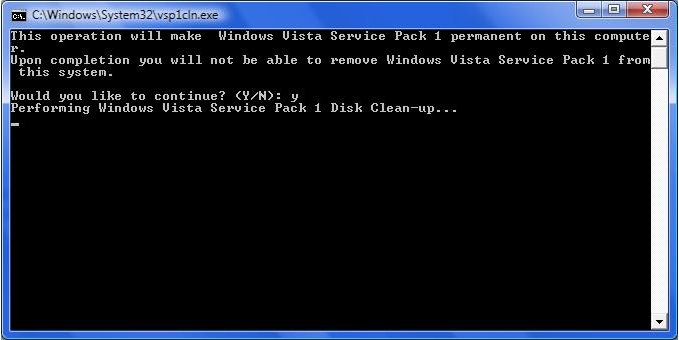
It asks for a conformation and then cleans the SP1 installation files and makes SP1 permanent.




Thanks for info. But I’m still use XP for my PC.
thanks for tip..will use it
about 0.9gb reclaimed. it’s ok i guess, thanks for the tip
Thanks for sharing. I just use this to housekeep my pc.
Seriously…Thanks for a great post
“…you will not be able to uninstall it again.”
do u mean u can’t uninstall it or what ?
i really wanna try this but those above statement holds me.
mind explaining this term of “permanent” ?
thanx
I’ve just used it on my Vista machine at work and as eydryan said, it freed up about 0.9gb
I’m going to try it on my Vista machine at home later and see what it does there because that one is 64 bit, and I remember the SP1 installation for that being nearly twice the size of the 32 bit I have at work.
robb-
I believe he or she means permanent as in you can’t uninstall SP1 and revert to the OS version before Vista SP1. If for some reason you wanted to revert to your original version of Vista before installing SP1, you wouldn’t be able to do so.
FYI, if you slipstreamed SP1 into your Vista disc this is not necessary since a new install will not include pre-SP1 backups.
awesome idea – thanks for that. I never would have thought of htis.