

Many time when we want to sent large images as attachments, we first need to reduce the image size using image editor or else upload the image to free hosting sites and then sent the download link. Not anymore, here is a simple freeware, Shrink Pic, which can do the job of resizing images on the fly.
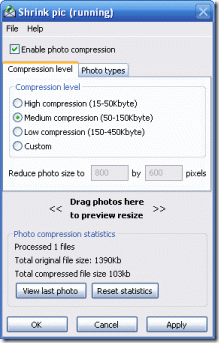
There are 3 levels of compression, High, Medium and low and also custom level compression. Once you install Shrink Pic, it automatically detects when you’re sending large photo files and compresses them in the background. It has a taskbar icon which tells you it’s waiting for photos to be sent. When it detects that you re sending a large photo, it automatically creates a temporary file and then compresses the copy and sends it instead of the original image. The original image is never altered.
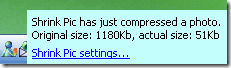
Shrink Pic can be used when emailing images, it automatically detects images from Outlook Express and also with webmail, such as Hotmail, Gmail, Yahoo! mail and others.
It can also be used while uploading images to web galleries or blogs and also sending images through Skype and Windows Messenger. You can upload photos using Internet Explorer, Firefox or Opera. Shrink Pic will detect these uploads and automatically shrink and compresses those photos for you. You can check the complete list of supported platforms here.








Nirmal i want image resizing tool/web service which wont blur text part of image after resizing
This looks great for me to reduce the blog images 🙂
Seems more practice than I usually do by resizing in photoshop.