

Many times when we download files, we are not sure about the size of the file. Only when the download starts, we come to know the file size. Get File Size is a free Internet Explorer add-on that allows you to find out the size of a file before downloading it.
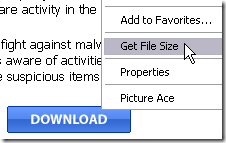
Once the add-on is installed, it will add an item to the right click menu. All you need is to right click on the download link and select Get File Size.
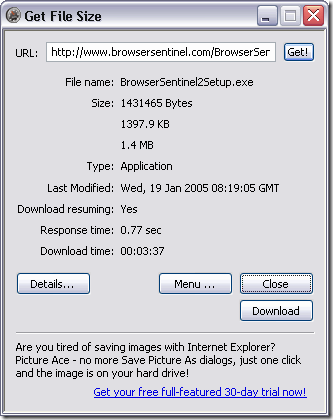
Img Credit: Get File size
Get File Size will show you the date when the file was last modified, file type, server response time and estimated download time. Get File Size can also retrieve the dimensions of JPG, GIF, PNG and BMP images without downloading the whole image.








Nice tool, but since it is limited to only IE not useful to me. I use Free Download Manager though and it tells me the size of the file before I can start downloading it and it works with pretty much all the browsers.
Add on for IE, sounds rare…. I am happy with DAP…
Do you know similar tool for FF?
Nirmal,
This is definitely a very useful tool. If you find a similar add-on for fire-fox like Nicky requested above, let us know.
Ramesh
The Geek Stuff
Good to see some add on for IE
Thats a neat add-on for IE but I guess we should get more if we search for it. I believe MS is not marketing IE like Firefox is doing.
I wonder how it predicts download time..
When sending header and getting response, it may be able to time response but without downloading the file (or take a predefined speed rate), it is impossible to measure download time, or it could be pretty inaccurate.
For FF user, download statusbar is an option, but it shows information in the status bar while downloading the file.
Well most of us use some kind of Download Manager, but getting file size before starting downloading file looks difficult, No workaround
for FF users 🙁
Search for Firefox addon with name “get file size firefox” in google. I am sure you will found something useful.
Is there any sites or website for checking the all file sizes?! you know
something like this : http://wgtools.com/link-checker/
this site only check the links for dead or working links.! but it could so
helpful if we can find a website for checking the files size. you know.?
For example:
I have 20 Rapidshare.com links and i want to check their size.
link1+link2+link3+ …
Total : 1.5 GB
I wondering, is there anything like this or this is just my illusion !!!!