

When you have a great collection of beautiful and high resolution wallpapers, you might be confused on which to keep as desktop background. Here is a small FREE application which does the job of changing wallpapers automatically at an interval set by you. John’s Background Switcher is a free application which will change your wallpapers automatically.
Not only it picks up wallpapers from any folder in your PC, but also from online photo sharing sites like Flickr, Phanfare, SmugMug, Picasa, and Yahoo. JBS sits in your system tray (down by the clock) and changes your background at the time interval of your choosing.
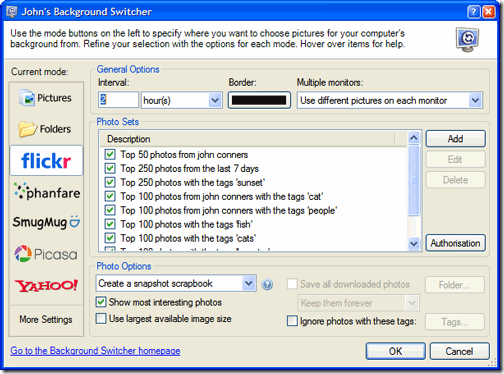
You can specify which pictures to choose from:
- Individual pictures on your computer
- Folders containing pictures on your computer such as ‘My Pictures’
- Flickr photo sharing – selecting pictures by person, tags, sets or just plain random.
- Phanfare web albums – keep up to date with your friends and family
- Smugmug photo galleries – yours, your friends, anybody’s!
- Picasa Web Albums – choose from specific albums or any search text
- Yahoo! image search
This freeware will work on Windows 98, ME, 2000, XP, 2003 and Vista (both 32 and 64-bit version).
Download John’s Background Switcher








That looks pretty nice, I really like the fact that it can connect to Picasa, Flickr, and SmugMug. Thanks!
Yes Nirmal,
Getting wallpapers automatically from web is really cool. I liked that.
Nice software. Like the fact that it works with online services too.
Its integration with Flickr is really a good feature.
Guys, give this tool a try, you may like it better (because its simple and better!)
http://jigar-mehta.blogspot.com/2011/08/color-desker-is-wallpaper-changer-for.html