

If you are using Outlook 2007, then you must be familiar with Ribbon. The Ribbon is a new feature in Office 2007 and has a lot of features and many of the old features in Outlook 2003 are hidden or rearranged in 2007 version. One such feature is the resize image option for attachments. This option is available in the ribbon after you attach the image. Click on the small icon in the Insert attachment option, this option will be available only after the image is attached.
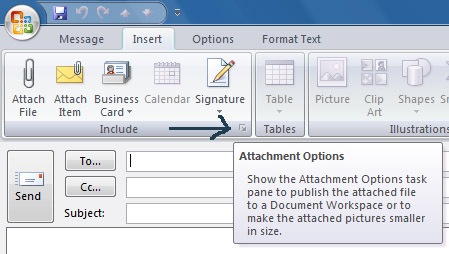
Once you click on the icon, you can attachment options. At the bottom you can see Picture Options where you can set resize options.

This is useful if you have restriction in size of images being send through your mailbox.




Nice tip. Thanks for sharing. I don’t use Outlook anymore. Mozilla Thunderbird is thundering cool! 😀
Went googleing and could find the answer of how to set this up using the registry (as we want to set this up in a corporate situation)
had to use reg mon to find it so thought i would be nice and share it.
NOTE: Modify your registry at your own dicretion i am not resposible for any consequeces of you action. Nor is the Website you found this one.
Dont touch this if you do not know what you are doing
FYI to set this to appear as default look at
[HKEY_CURRENT_USER\Software\Microsoft\Office\12.0\Common\MailSettings]
“AdvertiseSharingOptionsCount”=dword:00000000
“AdvertisePictureOptionsCount”=dword:00000000
The real question is how do you get Outlook to STOP ASKING you to resize pictures. This is the real PITA as I see it yet it is never addressed. I need to send full sized fotos, do it as an attachment, (to be nice), and ALWAYS have to answer the call of the Microbrain in charge of software development up at Redmond.
bonjour,
merci pour cet astuce car j’avais justement ce pb. mais malheureusement pour moi sur la fenetre l’option des images n’apparait pas seul le 1er apparait (send attachment as). comment faire pour que l’option permettent de gerer la taille des fichiers apparaissent? merci de me repondre.
cordialement
I have tried to resize some large GB photos but when i hit the icon in the ribbon the resize section is missing. Have i deleted it or have i altered some setting within my computer so it doesnt appear.??? Or do i need to change some setting in the computer to have the setting reappear ??? Or have i done a houdi and made it disappear forever.???HELP!!!!
I will immediately seize your rss as I can not to find your e-mail subscription link or e-newsletter service. Do you have any? Kindly let me realize so that I may subscribe. Thanks.