

If you are working on lot of files and folders and you need to reboot computer after any installation, its difficult to rebuild all the open windows after the reboot process. But Windows has an option to save the windows that you were working on and open them again on start up in windows.
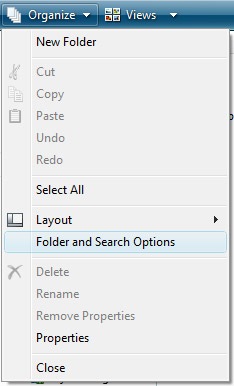
1. Open any Explorer Window and click on Tools-> Folder Options (in XP) and Organize-> Folder and Search Option.
2. Under View tab, scroll down and check the box labelled “Restore previous folder windows on logon“.
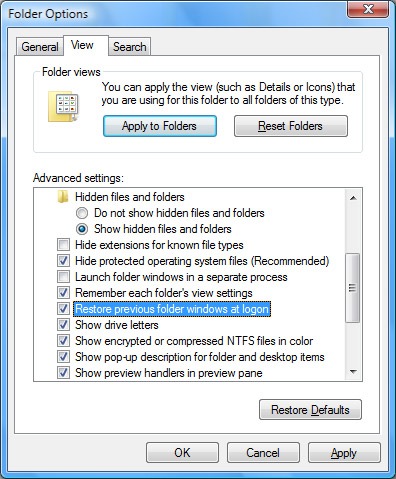
3. Click OK and next time you restart your PC, all windows from previous logon will be opened.





Nice find Nirmal, we face this situation quite often, this is going to work great.
Thanx for sharing it. 😀
Thanks Nirmal, Nice Time Saving Tip.
What a time saver! Sometimes the littlest of tips do wonders too.
This is pretty useful in case when you are installing something.Its a headache to open them again in case they are deep rooted
Yes, that is useful, and something I use all the time; however, if Windows crashes or reboots unexpectedly for some reason, you lose those open windows.
Anyone know of a utility that will keep track of open windows, saving them immediately instead of at shutdown / reboot?
Glad that everyone liked the tip.
superb ! helpful thank you very much
It is really a shame on myself. Why in the hell, I didn’t know this?
Anyways, better late than never. Thanks Nirmal…
🙂
Tried this and it doesn’t work. I don’t even have a folder option under tools. I do have XP.