

Vista has lot of improvements over XP in features and design. People who use Vista for first time complain that many commands or features available in XP are missing in Vista. When using Vista for first time, it may be difficult to spot common commands used in XP and one such is the Run Command. Run Command is not available in Vista start menu by default. You can always use the run command using short cut key- Windows +R. If you need the run command in start menu, you can restore it in 3 simple steps.
1. Right click on the Vista start menu and click Properties.
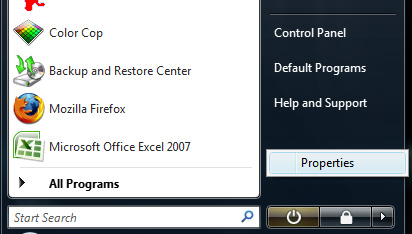
2. In the properties window select the tab and click Customize.
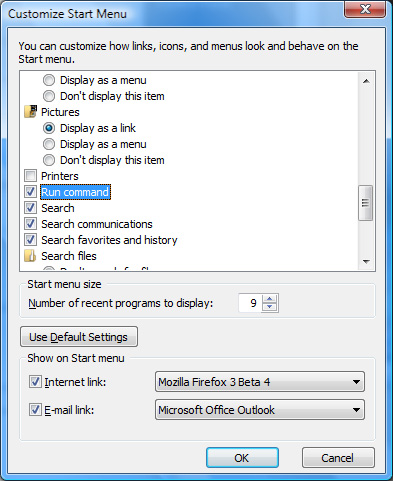
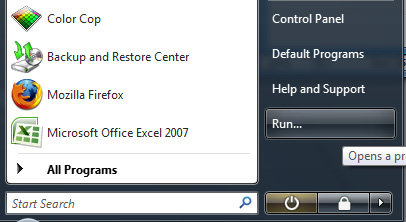
3. Scroll down and tick the box to the side of Run Command. Click OK and now you can see Run Command in the start menu.
More Tips and Tricks on Vista coming soon.



Hmmm really very good! Makes it easy with pictures on.. thanks sir…
Life rocks Nirmaltv !
THanks for the tip Nirmal. Till now, i was satisfied with Windows + R
Nirmaltv Sir ,
I have mailed you regarding the theme through contact me form.. please look into the matter …
I need your help sir…
wow, that was a nice tip… I am using the classical startmenu now for the only reason that run command is not present in the new version. And I started using the keyboard shortcut windows + R for this nowadays. 🙂
thanks..
its nice trick,simple but not known by everybody
my problem was that i was not able to find the “run” in the accessories folder in the all programs as it is usually there..
still after this trick that icon is missing at its right place..
could u suggest how to recover that…
thanks a lot..
We can use Vista’s new ‘Start Search’ edit box in the Start menu instead of Run command…
el programa de imágenes y video de mi windows mobil no abre y no puede ver las imagenes , pero al sincronizar con el PC estan como, restablesco para poder verlas en el mobil
no esta start search o no lo encuentro
can someone help me I can not upgrade in Windows Vista
and see if I already have the automatic updates and got everything right.
Someone help me ..
THANK YOU ..
sorry the English
hiii
i want to knoew how we can use gpedit.msc in vista.. this exe is not in home edition .. what hould i do
Thanks for the tip on how to put the RUN command on the start menu. It is a permanent fix, unlike the WIN+R shortcut.