

MMM free is a useful software to customize your Windows right click menu. When you have a growing list of applications, size of your right click menu also increases as most of the applications ad a menu. This results in a long right click menu which is difficult to manage. This freeware application lets you configure any right-click menu no matter which file you click on. Mmm lets you get rid of the items you never use. Lets you move those items you rarely use out on a submenu.

Customizing the menu is a bit confusing at the first moment. You need to right-click a file and then immediately launch MMM. This hows up a list of commands that can be run, which you can drag under “Hidden Items” or “Rarely used”. If you select items into “Rarely used” category,then it added an option in the menu.
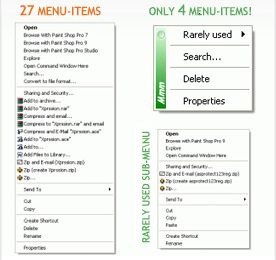
This software runs in memory , but used very less memory. The whole program is just about 508kb. MMM is supported only in Windows XP.
Img Src: MMM Free







500kb is quite impressive, and I’ll be trying this out.
Need to de-clutter the currently cluttered context menu.
PS: Thanks for pointing out the scroll bug in my blog’s design, and I thought I should return the favour. The single page looks great here, but your index is not as good. Just suggestions, of course:
Contrast is low for the post designs – the black text on light blue background does not go well.
The sidebar widgets and the post listings at the bottom contain only white bg and a plain border, which looks bare. Also, I believe you’re using FF’s rounded corners, which does not have anti-aliasing and is ugly.
Post listing in sidebar with tabs, does not have uniform padding on right and left, and has no arrow/bullet etc.
These are just my views, and I am pretty sure others love this theme as it is. Just my 2 cents, for what its worth.
@Sumesh,
Thanks for your valuable suggestions, will consider while implementing new theme. As of now, only sidebar list will go for a change in 2 days. I have already designed it.
Looks like a nice tool to clean out unwanted context entries which softwares usually put in
I am using this one to declutter my context menu too. The WinRAR and WinZip tools wasted my right click menu too much.
I tried this application before. It’s very good to reduce your long list of menu items. But yes, as Nirmal pointed out, it may be a bit confusing at the first go.
Anyways, a good tool to add in your softwares armoury.
🙂
“Hie,
I’ve looked for ways to reduce my right click menu. I hope the MMM Free can bring the solution for this.
Thank’s”
This looks like it could be quite a useful program, my only concern in using something like this is that when you then use another PC, you feel completely lost without it! 🙂
wow this is really nice app, thanks for sharing
did anybody manage to get it work under win7, using compatibility mode?