

LockImage is a free open source software to protect your images with a password. LockImage protects an image by converting it into a password protected executable with an embedded viewer. It consists of exactly one file and does not need any installation. All you need to do is to download the software and run the exe file. From the file menu of the software, select Open and open any image you want to protect.
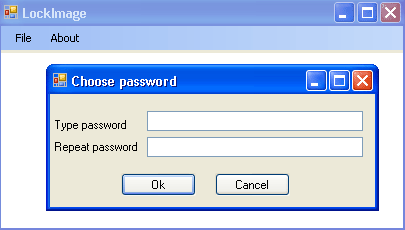
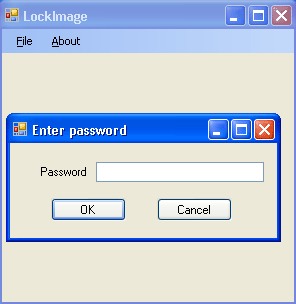
Now select Save As and you will be prompted to enter the password for the file. Once you click ok, an exe file will be created with the name provided. Whenever you open the exe file for viewing the image, it will again prompt for the password. Once you enter the correct password, the image can be viewed with LockImage.
This is a great utility to protect images, especially if you are sharing them over the web. The only problem with this utility is that the image becomes and exe file and e-mailing this could be a problem as most of the e-mail services do no allow .exe files. But then there is always the zip utility to send files.








Looks like a nice tool to protect photos from others, I take a lot of pictures and some of them are only for friends and family so this will help to lock them out from others.
It is a must utility for use in Hostels.
Nice tool! Also, is it “does need any installation” or “does[n’t] need any installation”? I prefer no installation. 😀
@Madhur,
Good thought! 😀
@Grace,
Sorry for that type. It actually does not need any installation. 🙂
Really, a must have utility. Now I need not to delete “those” college pics when I am going home.
🙂
@Rakshit,
Looks like everyone is interested in protecting college photos. 😀
WOW… never realized I could actually do that. Prior to this, I used to lock images by compressing them into a RAR archive. Thanks for the heads-up, Nirmal.
Pretty Neat. People who have problems locking folder ( which they wanted to use to hide images ) can now use this. I am just trying to understand the way its done internally. Word can be locked I understand its mechanism but how does this software marks the image to be locked.
@Thilak,
Glad that you liked this.
@Ashish,
I think its a windows forms application, the one we had earlier. I’m not sure how its coded.
Hi all from the developer of LockImage 🙂
I am experiencing problems adding comments to this site. This is just a test..
Aziz
@Aziz,
Glad to see you here. 🙂
Your comment was in moderation.
@nirmaltv : thanks :Hi all
I am glad to here such a lot of feedback from you. Please feel free to make feature/enhancement requests
at http://code.google.com/p/lockimage/issues/list or http://groups.google.com/group/lockimage.
Here are some answers to the questions mentioned in the comments:
1) LockImage is a dotNet application. See the LockImage.Gui package for the Gui code.
It is simple.
2) This is how it works:
# open the image and convert it to an byte array
# encrypt it with IEncryptionEngine.cs, Actually there is one engine: RijndaelEncryptionEngine.cs.
# clone the application executable to a new copy (simple file copy :-))
# add the encrypted byte[] to the new generated copy as a resource. (check ResourceManager.cs
to see how it is done)
Cheers,
Aziz
@Aziz,
Thanks for the explanation on the application. I guess this will clear all doubts. Indeed this is a wonderful application.
That’s quite an impressive thing to do and could be good practice, although I can understand that the emailing aspect could be problematic, especially for those whose technical skills do not extend to zipping.
Se alguem ja teve problemas em fazer o programa, do tipo, abre-o e aparece uma jenela a dizer um erro..e porque não tem MICROSOFT FRAMEWORK instalado…apos a instalacao desse o programinha dará…lol
Deve ter sido programado pa uma certa liguagem…
can this software be used to protect photos on facebook(like when some1 right cliks on the image it dusnt allow the user to do so?
I have the same question as adam. will this application protect photos that are posted on Facebook, to prevent others from right clicking and saving the photo as theirs?