

Windows Live Essentials beta version (wave 4) was released to public few days back with some new features. If you are using Windows 7, then you can customize it using Windows Live theme. This theme is a visual style which can bring the look and feel of Windows Live. The package contains a themepack, wallpaper, visual style, shell32.dll and a new Start Orb with new User pic Frames. Since this is a third party theme, you need to patch your system files before using it. You can refer our tutorial on how to install third party themes on Windows 7.
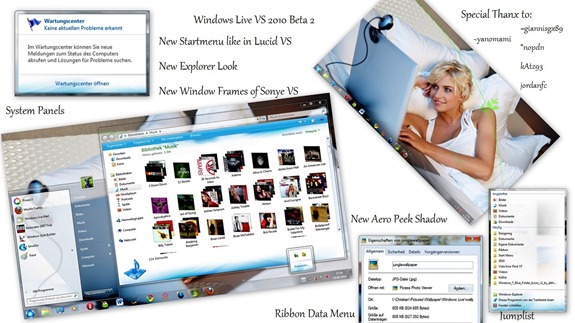
The theme comes with;
- Window Explorer
- Start Menu
- Start Orb
- Aero Peek Shadow
- Wallpaper
- User Pics
Download Windows Live Theme for Windows 7


Very nice themepack. Thanks
Could someone re-upload this skin? The DA link is broken :/