

A guest account allows people to have temporary access to your computer. People using the guest account have only limited access to resources in Windows 7. Although they have only limited access, it is always good that you take care of all security aspects when you create the guest account. By default guest account is disabled on Windows 7, but you can enable it easily using the control panel.
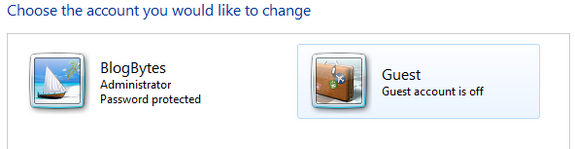
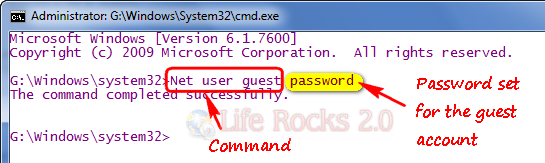
Control Panel->User Accounts and Family Safety->User Accounts->Manage Accounts. Click on the guest account to enable it. The guest account by default does not have a password, but you can set a default password to prevent any unauthorized access. To set a guest account password, open command prompt with administrator privileges and type “Net user guest password” without the quotes. Here password set is “password”.
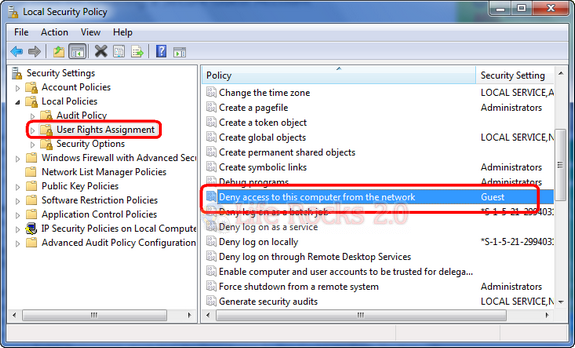
Guest account should never be accessible over the network as they are meant to be used for local system. You need to make sure that guest accounts are not accessible over the network. Open security policies (Run-> secpol.msc and press enter). Navigate to Local Policies- User Rights Policy. Here make sure that “Deny access to this computer from network” option has guest listed.
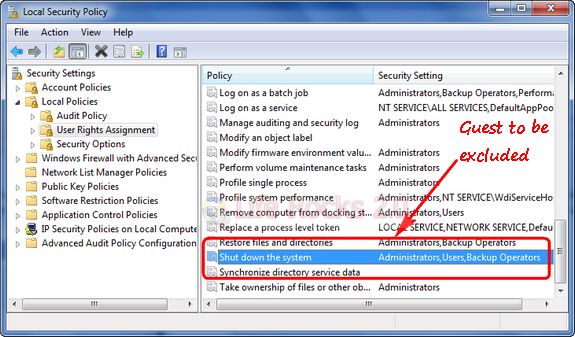
You can also make sure that guest account does not have option to shut down the computer. This can be again checked through security policies. Navigate to Local Policies- User Rights Policy. Under the settings “Shutdown the system”, make sure that guest account is not listed.
These steps should make your guest account secure and prevent unauthorized access.








1Start your computer.
2Press Ctrl + Alt + Delete twice when you see Windows XP logon screen.
3. When ‘Log On to Windows’ dialog box appears, type Administrator in the User name box.
4.Type the password in the password box, and then click ‘OK’. Or you can directly click ‘OK’ if you do not set a password.
5.Click ‘Start’, ‘Run’, type ‘control userpasswords2’, click ‘OK’.
6. On the Users tab, click the name of the user account that you want to reset the password for, and then click ‘Reset Password’.
7.Set your new password and click ‘OK’ on the ‘Reset Password’ dialog box. And then click ‘OK’ on user tab.
8. Restart the computer, and then try to log on to Windows again.
I have tried this method. I also found another useful way, besides, to use Windows Login Recovery tool can also achieve this. You can also have a try.
If you’d like to learn more, you can search it on web, or directly visit: http://www.windowsloginrecovery.com/
Very useful for me. This is what i have been searching for.
Thanks Emma, that was very helpful.
Great information, very clear explanation. Thanks a million!
I would suggest better to disable the guest account on any computer. It should be enabled only when there is a specific use case to enable logins for a user without password.http://www.windows-commandline.com/enable-disable-guest-account/
What’s up, for all time i used to check
website posts here in the early hours in the daylight, since i like to find out more and more.