

One of the best features of Windows 7 is the ability to rotate through wallpapers from a folder after a fixed time interval. We have also covered a simple trick on how to quickly change wallpapers in Windows 7. The wallpapers are taken from a folder which you specify or it will be the default themes folder. If you want to add some wallpapers to this folder, you need to manually navigate to the theme settings and then check the folder and open it. But with a simple registry hack, you can directly open the wallpaper folders from your desktop right click menu.
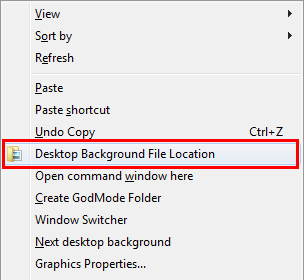
You can get this by a small script created by WinHelpOnline which adds this option to context menu in desktop. This script opens the current wallpaper file’s target folder and selects the file when you click “Desktop Background File Location” option.
How to Use this script
- Download the script and extract it (Thanks to Ramesh for this Script)
- Move the file WPTargetDir.vbs inside the zipped file to the Windows directory. You will need permission to copy it.
- Double-click Add.reg registry file to add the context menu option. (Take a back of registry before changing the registry)
- Now hold the SHIFT key down and right-click on an empty area in the Desktop. You’ll see the Desktop Background File Location option.
- In case you want to remove it, run the undo.reg file and manually remove WPTargetDir.vbs from Windows directory.
This script is also useful if you have thousands of wallpapers selected for a particular theme and you want to find the current desktop wallpaper. When you select this option, it opens the wallpaper folder and selects the current desktop wallpaper.








Thanks, Nirmal!