

We have covered a few application like Account Screen Editor, Screen Rotator and Windows 7 Login Changer to change the Windows 7 logon to custom one. Windows 7 Logon Editor is another free tool to change the Logon screen, but apart from changing the logon, it provides other options like editing the text, Windows 7 branding and also add some text effects to the user text.
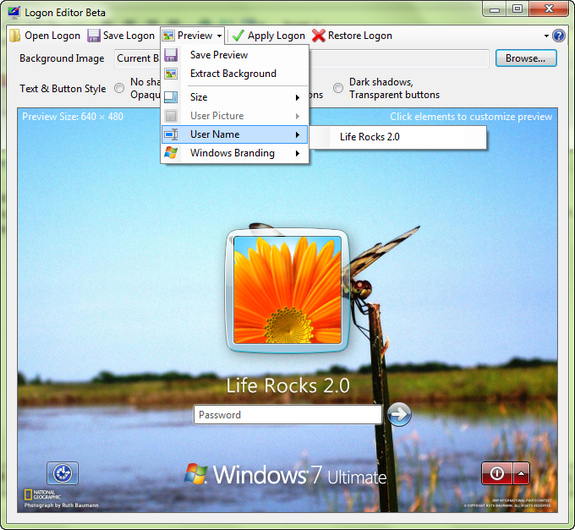
You can select the background picture and also set the size of the image. The preview tools allows you to change the size, rename the user name text which appears when you log in and also the Windows 7 branding. For example if you are using Windows 7 Home Professional, you can change it to Windows 7 Ultimate in the Logon section.
You can save the current logon, apply a new logon and also restore the old logon using this tool. Apart from this, there is also option to change the text and button style by adding shadow effects.
Download Logon Editor for Windows 7








Nice tip, thanks! Could you tell me where the background wallpaper is from?
i tried to use this program and tried to change the windows branding i have windows 7 home premium i got it to change to windows 7 professional and then i clicked apply logon and i got a message saying
application attempted to perform an operation not allowed by the security policy To grant this application contact your system administrator or use the Microsoft.Net Framework Configuration tool.
if you click Continue the application will ignore this error and attempt to continue if you click quit the application will close immediately.
Requested registry access is not allowed.
well this says it all