

Windows 7 has a different kind of network activity icon in the system tray and unlike the Windows XP style network icon which blinks, the Windows 7 default icon does not show any activity. Network Activity Indicator is a freeware tool which displays the old ‘two monitors’ icon in Windows 7 that flashed blue to show network activity on the System Tray.

Unlike the original Windows XP utility (that has individual indicators for each interface), this program indicates outgoing and incoming network packets on all available interfaces. You can configure the blink rate of the icons in the system tray.
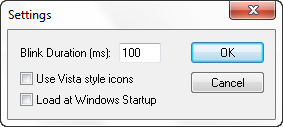
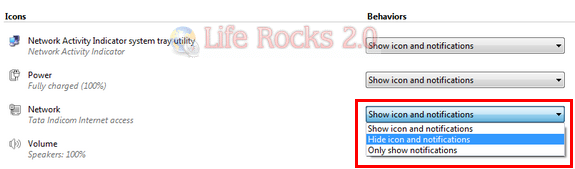
This utility is a standalone executable. Run the program, you’ll see a new system tray icon. If you want to remove the default Windows 7 network utility, then open the notification center in control panel and select “Hide icon and notifications” for the default Windows 7 network icon.
Download Network Activity Indicator



The Download Network Activity Indicator is perfect. I think most of your readers would appreciate this utility
Oh..its work…thank you so much :):):)
It is NOT Perfect… It ONLY Show two blinking Screens.
On right-click I should be able to access “Local Area Connection Status/Settings”.
If the author can incorporate this into the next build THEN it will be Perfect.
At present.. I have to left-click the Static “Network” Icon in the System tray… The Click “Open Network & Sharing Centre” THEN I can click the “Local Area Connection”… TOO LONG Process.
Great tool!
However, on my Win7 64bit version, this *.exe does not come back up and has to be executed each time – I wonder how we can make this run each time we run our machine?
Thanks!
You can try GabNetStats, it has been inspired by Igor Tolmatchev product, but has more features and is more optimized.
URL : http://www.gabsoftware.com/products/applications/gabnetstats/