

Windows 7 is by far the best OS to be released by Microsoft till date. When you install any software or drivers on Windows 7 or if any installation fails, it might cause issues with Windows 7 start up and this might effect Windows 7 booting. In case you encountered any such situation, best way is to repair Windows 7 using the DVD. Windows 7 DVD has system recovery tools to repair and recover issues with Windows 7.

To start repair, insert the Windows 7 DVD and restart your PC. Press any key to boot from the CD and Windows 7 will load the set up files. In the first step select the language and country and then click next.
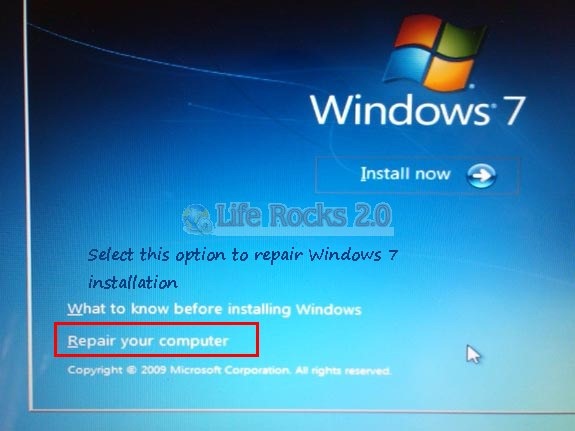
In this screen select the option “Repair your Computer” as shown in the image. This will open up the system recovery options. You can either use the recovery tool to fix problems starting Windows or else restore the computer using a system image you have created previously without repairing.
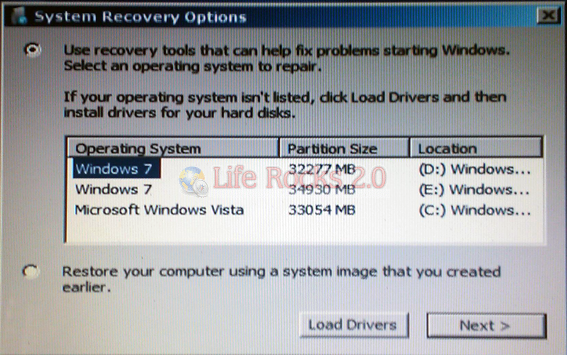
Select the partition where your Windows 7 is installed and then click Next.
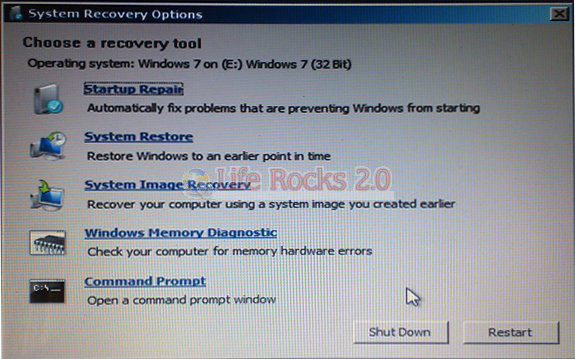
Here you can see the recovery options available. Startup Repair tool should be able to solve any issues causing Windows startup. There is also system restore or system image recovery if you have enabled these options previously. Once you have repaired Windows 7, you can restart the PC and login.







Hi
I am using windows 7 in toshiba m satelite 200 model
i am getting black screen after on jsut with cursor i can operate my laptop by pressing alt+ctrl+del only ,can you help me solving mine problem.Can i solve thsi withour installing windos again as cab save data but i don’t want to loose browsing history and how i can repair means if i repair then my data will be save or not and browsing history also.
Regards,Anudeep Kanwar
i need to know i have upgrade window 7 from vista at that point i was not having internet but now i am having internet.and my activation dat has expired.so what can i do.
If the repair option is not there and also during repair if it tells u that O/s not found then what is the soln my friend……
Though this may look no brainer i spent 30 minutes to find the repair option..
You saved my time bro…
after switching on my computer it boots and show me all desktop icons, then it shows a blue screen and it reboots again asking to start window normally, so what can i do to fix this problem? sometimes it give a message “check solution online” but whenever i click on it nothing happen.
Hello!
The company I bought my computer from installed my OS. Anyone who know how I can find it? I have Windows 7, if that’s important to know.
A reply is much appreciated.
I have a Gateway Windows 7 Upgrade disk and it won’t give me the repair option. Any ideas?
Grt post, will surely help resolve issues….
Hello i am using acer emachines-D725 with windows 7. My DVD-ROM is not working. It is not showing any data from CD.
Thank You, I’m use Windows 7 Ultimate for LAPTOP Acer
Thank for the help