

Aero Peek is a newly introduced feature in Windows 7. As the name indicates, you can peek into the desktop if you have lots of Windows open. With this feature, you can quickly have a look at the desktop without having to minimize any of the windows you were working with. What this feature does is to make all the active windows transparent so that a view of desktop is available. This article helps you on how to use Aero Peek, disable it if you don’t want the effects.
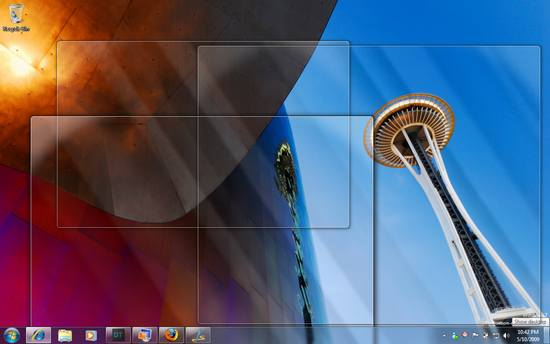
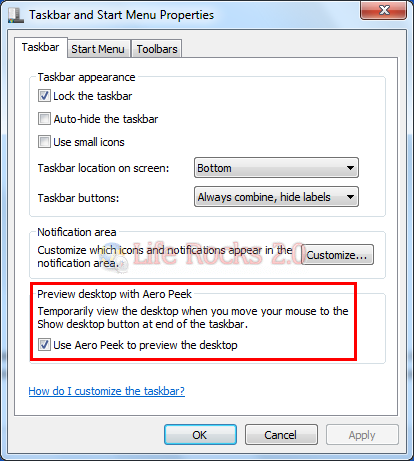
To use Aero Peek and have a peek at the desktop, move the cursor to the extreme right corner of the task bar and keep the cursor on the small portion (you do not have to click, just hold the cursor). This shows a peek at the desktop as shown in the above picture. If you want to disable this feature, then right click on the taskbar and select properties. In the taskbar tab, uncheck the box against “Use Aero Peek to Preview desktop” and this will disable aero peek.
Another feature of Aero Peek is the thumbnail previews. If you keep the cursor on the taskbar window, you can see thumbnail previews of the open window, and moving the cursor on the preview again shows the Aero peek feature, all the windows except the preview one are made transparent.
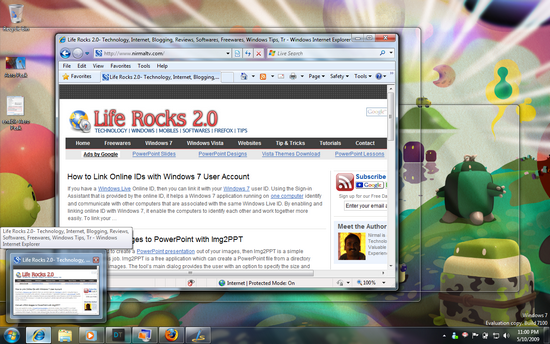
You can see Aero Peek for thumbnail previews in action in the above image.








You can download Aero Peek for Windows Vista at http://fogelsoft.extra.hu/progs/aeropeek.zip
Hey Nirmal, theres a silly typo.. Its PEEK not PEAK
@Quakeboy
Thanks for notifying, updated the post with the correct spelling.
@Davin Peterson
Thanks for sharing that.
It works great!
@Nirmal
You have fixed the typo in the post, but it is still showing peak in the Title Bar of the Browser.
I’m running windows 7
Can someone please explain to me what is the purpose of the “aero peek” feature. If i’m looking at a website, why would i want to see the desktop. I’ve opened several IE windows at one time to see how aero peek worked, but all windows close and show desktop. I move the cursor up and the website i was viewing comes back up. If it would switch from one window to another window that would make more sense.
Wheather or not aero peek is enabled or disabled, the function of the taskbar remains the same when IE windows are open. If you hover the cursor over the icon, the mini windows (as i call them), are still there and function the same. Any answer would be appreciated.
Thank you