

Ever since Windows 7 Beta was released to public, there has been lots of customization packs based on Windows 7 for Vista and XP. The looks and features of Windows 7 were widely accepted. Deviantart user has created a customization pack for Windows XP which transforms it with the looks of Windows 7. The theme pack will run on Windows XP SP3 English versions only.
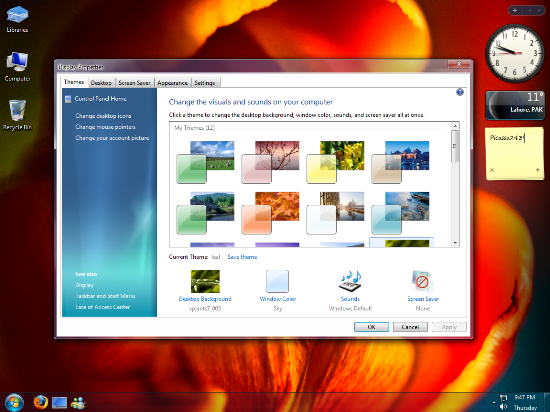
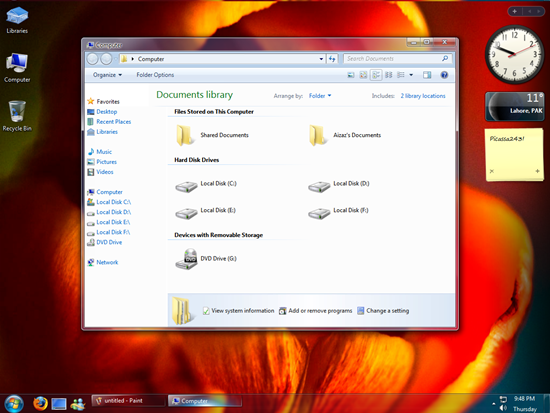
Img Credit: Author of theme (Picassa243)
The pack has mostly the improved and revamped versions of my Mods for Windows7. The customization pack includes ;
- Windows Vista System Properties (Sysdm.cpl)
- Windows Automatic Updates Mod
- Windows Security Center Mod
- Windows 7 Gabriola Font for XP
- Windows Seven Calculator for XP
- Excellent Styler Skins from Win7 Build 7000.
- Exclusive and official Windows-7 Wallpapers
- Perfect theme for Windows-7 by Ernasco
- Windows 7 and Vista Findexer Kit for XP
Note from the Author: The pack transforms the major system files bringing a change in the way the GUI looks. The sidebar however is not included in the pack.
Download Customization Pack for XP








Will this pack be a strain on an Asus EeePC 1000H (N270 processor and I’m sure you know the rest of the specs) Please let me know…
hi ! do you have step on how to install this superb and cool prob in xp? thanks you so much…
is this pack is the same as windows vista inspirat? all we need is just to install once? and no complicated tweaking as the rest of the deviant art’s gank? is this pack can only be used by xp sp3 not sp2?
Hey i have downloaded this in zip format but now they ask for password what password for this?? Email it to me please. Thanks in advance
Hey i have downloaded this in zip format but it ask for password. Whats the password ??? plz email it to me please. Thanks in advance
Hey its very confusing how to install this?
hey i have installed this zip and acctionly it was so great that it change all my pc scheme and theme and it downloaded the transformation pack that it is more than an only a theme , well it give me the oppetunities to use windows 7 and try it before buying it , well its cool , you have better think to try it as soon as you got to this website , well it does not matter wether you have a new computer or an old one the thing that matter is that you have to have windows xp sp3 and the windows installer and the microsoft.net framework 4.5 beta or the full version this requierment the program need theme only when installing the program but after you install it you can delete it it does not matter .
but probably for more goods check if you have an anti virus that it acctionly it help to tell you if this program is a virus or not , thats only if you do not trust any website ,
you know some people think that those programs are from hackers but acctionly they are all ediot they do not understand what is a transformation theme pack for computer .
and the second thing for the goods for your computer you must have prossesor pentium 4 minimum
thats are only in some cases and a video adapter or direct x 9 or up .
Hey i have downloaded this in zip format but now they ask for password what password for this?? Email it to me please. Thanks in advance
thankes
Everything’s fine. i have extracted the RAR file and its showing its contents. but how do i install it.
what are the steps to after extracting the files?
how to install it?!
is this free to download and to use??
How do you install this pack?!?!
How do you install this pack?!?!
This is so confusing. I can see you have put up a good effort but it’s confusing to install. Why don’t you add few lines about how to install this?
i have down loaded this in rar file and when comes to installing… no instalation compenents found… pls let us know how to install this…
hi i have download this theme but i dont how how to install it plz can you tell me how to install it plz send the procedure in my email i am waiting for your reply THANKS
i like the theme picture but what is the password please email it to me thanx
whaht is the pass word for windows 7 transformation pack
Argh,This is for window blinds guys…cos it’s a wba file.The file in the Themes folder i mean…
Hey i have downloaded this in zip format but now they ask for password what password for this?? Email it to me please. Thanks in advance
hey ,can anybody send email for me how to instal this pack please ??..and the password
thanks
what is the password for the win 7 transformation pack please sent my mail id
In downloaded this in rar format and have no idea on how to install this. Please help
please tell me how to install this….i have extracted its contents but m not gettong that how to install this…plz tell me the steps
could you please give a few directions on the installation process?
please send the password to my email.thanks
If I install it, do I lost all my files ?
How on earth do you install this.
please i hv downloaded the pack and extracted the files but how to install?????no intalling file set up as in other packs
Well only one query!!!
“How to install THIS”
Waiting for your reply!!
Thank u
why would some one post this download and not tell us how to install it. cuz its not real!!!
I was searching for this type of software for a longtime
Hey everybody,
This theme is actually working and looks pretty cool!,
What u just need have/use to make it work is a “Theme enviroment supporter” called WINDOWS BLINDS, here’s the link:
http://www.stardock.com/products/windowblinds/
Enjoy!, Peace.
You need WINDOWS BLIND to make this work, peace!
http://www.stardock.com/products/windowblinds/
i downloaded the software & installed.i also downloaded the transformation pack.rar.now what i should do
Hey yo!!!!!!!!!! can you tell me how this thing works????I’ve wasted three hours for nothing.
how to install win 7 customization pack
Great help, thanks for sharing this one..
is this damages my pc sp3 windows xp?