

BatteryBar is a simple, straight-forward and freeware battery meter that monitors the status of your notebook battery and displays your battery’s status in the taskbar. BatteryBar constantly monitors the status of your battery as you use your notebook or laptop. One of the good features of BatteryBar is that it gives accurate results on the battery remaining in laptop.
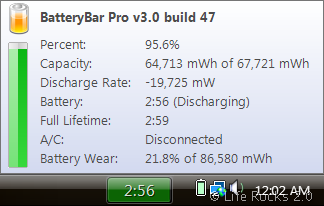
With the estimated battery it also gives an accurate result of how much time is remaining on the battery. When you’re running on battery, BatteryBar shows the percentage bar in green, yellow, or red, depending on how much battery power is remaining. The bar displays the time left on your battery in Hours:Minutes

When you keep the laptop for charging, it displays the time required for the battery to be fully charged. The indicator is shown in blue color and when the battery is fully charged, it shows it as black.
Other features of this utility;
- The toolbar has the same look and feel as the Vista taskbar buttons
- BatteryBar monitors your battery and keeps a history of how long it takes for your battery to charge and discharges. That information is used to more accurately predict the life of your battery
- BatteryBar fully or partially supports 13 languages. Anyone may volunteer to translate BatteryBar to additional languages
- BatteryBar is now capable of collecting detailed information about your battery, including max capacity (mW), current capacity (mW), charge rate (mW), discharge rate (mW), and more.







