

In Windows XP and Vista, if you wanted to change the wallpaper on your desktop automatically, you needed to install third party applications. With Windows 7, a new feature has been added by which you can automatically change wallpapers in Windows 7 after a predefined time. This setting can be enabled from the desktop personalization menu and you can specify any wallpapers you wish.
To rotate wallpapers automatically, right click on the desktop and select Personalize. Towards the bottom of this window, you can see a link to set Windows desktop background.
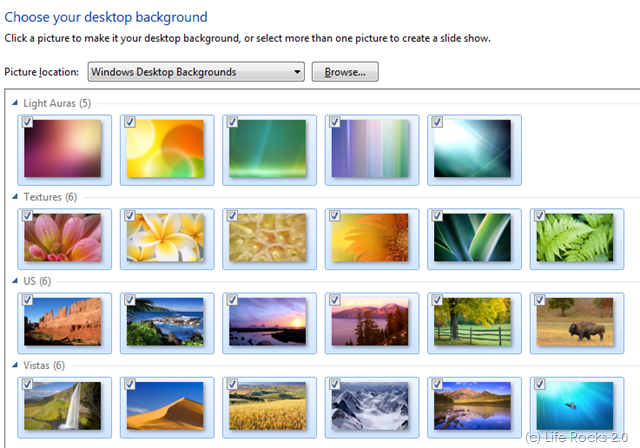
You can select any wallpapers you wish from the hard disk using the browse option. Once you select the background images, you can see the automatic rotation settings enabled below.

You can select the time for changing the wallpapers, although there are enough options available, custom time selection is missing here. Click OK and now you can see the setting in action. It changes the wallpaper automatically after the time you have set.








This is a sweet add! Finally built in the operating system without 3rd party software!
how long is a “specified time” i have just bought my laptop and cant do anything regarding my wallpaper!!
nice wallpaper
thank’s man !
Does it work in 7 Home Basic? Can’t manage to do it
It doesn’t seem to work for me. Is it due to the laptop being on domain?
i followed all the instructions and ended up with a plain blue desktop and no pic… HELP???
boss i am not getting option to set the time shuffling for wallpapers automatically in mah mini laptop
Windows 7 Basic, which is what comes preloaded on most Netbooks and some of the extremely inexpensive laptops, does not support the changing of desktop wallpaper.
Microsoft in their “infinite wisdom” has deemed that changing of the wallpaper is something that basic users shouldn’t need to do.
You would have to upgrade to at least Home Premium to have that functionality.
Ok, it doesnt work on windows 7 home basic, it only works on windows 7 home premium, im sorry basic users
btw on the desktop screen you can set it to change from 10 seconds to days! it is really awesome!
Check out this software which changes your wallpapers automatically and best thing is it gets the wallpapers from the internet, which are optimized for your screen resolution! More info at,
http://jigar-mehta.blogspot.com/2011/08/color-desker-is-wallpaper-changer-for.html
It’s easy to change the wallpaper using Windows’ functions but it is more simple to use an wallpaper changer program to do that. It takes only 5 seconds and you have to take 1 single step not 5 to customize your desktop background. I tried this program Bionix Wallpaper Changer and it is pretty amazing: http://www.bionixwallpaper.com/articles/change%20the%20background%20wallpaper.html
THANKS……….