

When you install the Windows 7 beta version, you can see some changes in the start menu when compared to Windows Vista. Similar to Vista, the Run command is not available by default in Windows 7. Many people who are still using Windows XP might want to see the run command in the start menu. Run can be enabled in Windows 7 as well like Vista.
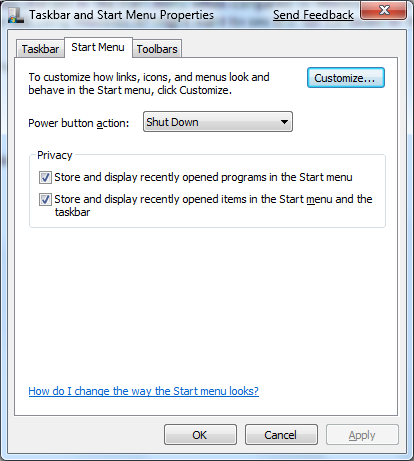
1. Right click on any open area in the start menu and select Properties.

2. Select the Start Menu tab in the properties window and click Customize button.
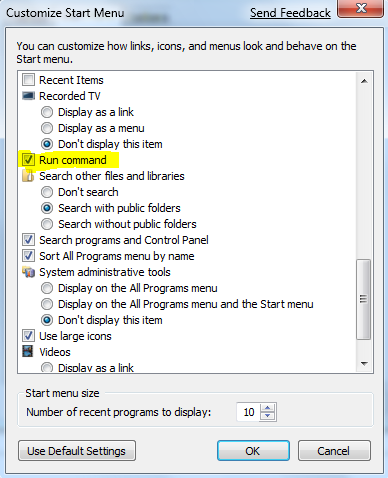
3. In the customize window, check the box against Run Command and click OK.
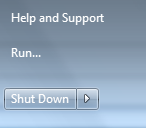
Now if you open the Start Menu, you can see the Run Command added to it.








Thanks for the tip!
Or.. just press Win+R…
Thanks for a great tip. Now to try and get rid of the rest of the Cr*p on start up on windows 7
Thankyou so much for this, I don’t know how you do it! Who would have thought that the way to alter the start menu is to edit the start menu’s properties? I don’t think anyone would ever think to look in the options to see if there’s a checkbox to turn it on – you know, just like in XP…
Well done.
Thank you so much !
thanks…
thank you …sir !! 🙂
Thanks for a great tip.
There might not be a need to enable Run command in Windows 7. Instead, when you click on the Start menu, there is a place to type “Search programs and files”. Type there whatever program or path that you intend to open from Run. it works!!
Easiest way is to hold the windows logo key abd press the R key.
Run pops up ready to use!
run has been cancelled due to restriction effect on this computer.
How to repair?
your the man . thank you so much . you saved the day ^_^ . god bless you
hello how can i save 20% of internet speed using run commands , can you give me a list of run commands to use with win7 and win xp thanks for your help
thank you soo much
Ok here is my problem, I don’t have the ‘Run Command’ check box in the ‘Customize Start Menu’.
So whats the problem there?