
Advertisements
Previously we had written about a web service where you can create your own iPhone theme in 3 steps. Here is another service which is similar and allows you to create iPhone Themes. The steps for creating theme is again similar and you can add your own icons, wallpapers and status bar. The site works on Microsoft Silverlight, so you will need it to be installed in your PC to create themes.
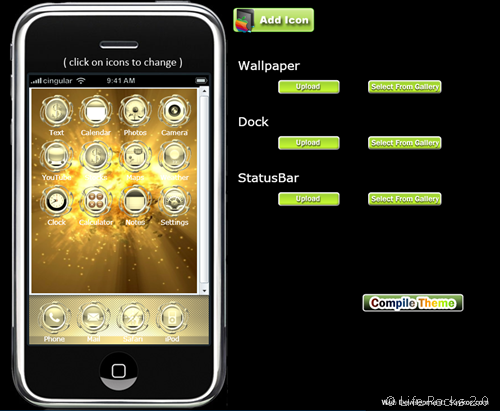
The site also gives information on how to install a theme on iPhone. To create a theme, just choose your wallpaper, dock and statusbar from the library of upload your own bitmaps. Also choose the icons styles you like and click the Compile theme button.









[...] About us iPhoneThemeGenerator Makes It Easy to Customize Your iPhone [IPhone] Saturday, November 1st, 2008 @ 4:30 pm | Author: admin Web utility iPhoneThemeGenerator remakes your iPhone in your image. The site holds your hand through icon, background wallpaper, and dock changes, allowing you to customize every element to your liking. You can choose pictures from the default galleries or—if you’re the creatively talented sort—you can upload your own images. When you’re finished, the webapp compiles the theme in an iPhone friendly format. To get it on your phone, you’ll need to have jailbroken your iPhone, then follow the instructions on the site. If you don’t really feel like you own a gadget until you’ve fully customized it to your liking, this one’s for you. iPhoneThemeGenerator [via Life Rocks 2.0] [...]
[...] Web utility iPhoneThemeGenerator remakes your iPhone in your image. The site holds your hand through icon, background wallpaper, and dock changes, allowing you to customize every element to your liking. You can choose pictures from the default galleries or—if you’re the creatively talented sort—you can upload your own images. When you’re finished, the webapp compiles the theme in an iPhone friendly format. To get it on your phone, you’ll need to have jailbroken your iPhone, then follow the instructions on the site. If you don’t really feel like you own a gadget until you’ve fully customized it to your liking, this one’s for you. iPhoneThemeGenerator [via Life Rocks 2.0] [...]
[...] Web utility iPhoneThemeGenerator remakes your iPhone in your image. The site holds your hand through icon, background wallpaper, and dock changes, allowing you to customize every element to your liking. You can choose pictures from the default galleries or—if you’re the creatively talented sort—you can upload your own images. When you’re finished, the webapp compiles the theme in an iPhone friendly format. To get it on your phone, you’ll need to have jailbroken your iPhone, then follow the instructions on the site. If you don’t really feel like you own a gadget until you’ve fully customized it to your liking, this one’s for you. iPhoneThemeGenerator [via Life Rocks 2.0] [...]
[...] Web utility iPhoneThemeGenerator remakes your iPhone in your image. The site holds your hand through icon, background wallpaper, and dock changes, allowing you to customise every element to your liking. You can choose pictures from the default galleries or—if you’re the creatively talented sort—you can upload your own images. When you’re finished, the webapp compiles the theme in an iPhone friendly format. To get it on your phone, you’ll need to have jailbroken your iPhone, then follow the instructions on the site. If you don’t really feel like you own a gadget until you’ve fully customised it to your liking, this one’s for you. iPhoneThemeGenerator [via Life Rocks 2.0] [...]
[...] Vía | Life Rocks 2.0 [...]
Thank you very much for this site.
[...] About us iPhoneThemeGenerator Makes It Easy to Customize Your iPhone [IPhone] Saturday, November 1st, 2008 @ 7:00 pm | Author: admin Web utility iPhoneThemeGenerator remakes your iPhone in your image. The site holds your hand through icon, background wallpaper, and dock changes, allowing you to customize every element to your liking. You can choose pictures from the default galleries or—if you’re the creatively talented sort—you can upload your own images. When you’re finished, the webapp compiles the theme in an iPhone friendly format. To get it on your phone, you’ll need to have jailbroken your iPhone, then follow the instructions on the site. If you don’t really feel like you own a gadget until you’ve fully customized it to your liking, this one’s for you. iPhoneThemeGenerator [via Life Rocks 2.0] [...]