
Window Extractor is a free Windows utility which allows you to pop out embedded videos and windows in other applications and place them into their own separate window that you can resize or make full screen without title bars or borders. This is specially useful when viewing videos from YouTube or other websites, show a presentation etc. When the extraction software is closed, the window or frame returns back to normal mode.
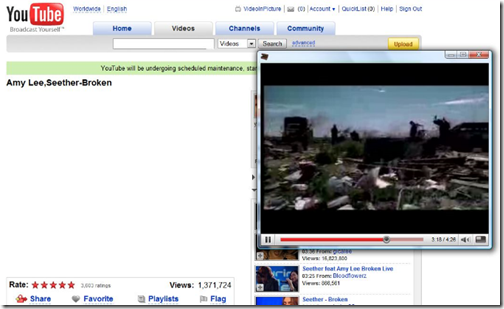
Above you can see Windows Extractor in action separating YouTube video from the main window. To extract the window, keep the mouse on the video or frame and then click the shortcut key and you can see the window separating out. The shortcut keys for separating and restoring windows can be done in settings. You can also select whether you want to view in full screen or resize the window.
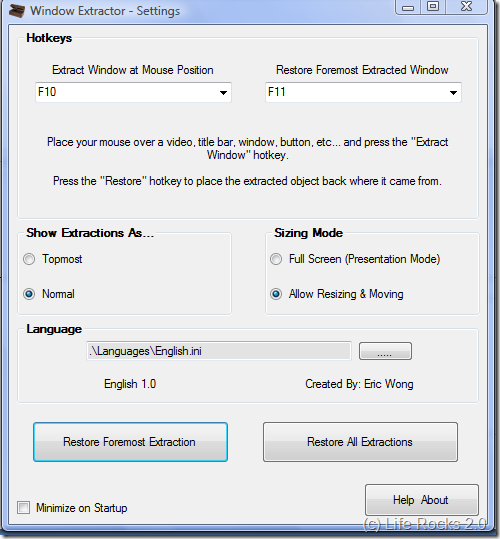
Important thing to note is that this is not compatible on all windows/videos/objects and can cause crashes on incompatible programs. This utility is open source and the code is available for download.









[...] Windows only: Free, open-source application Window Extractor pulls embedded videos and even windows out of the application they’re confined to, placing them in their own independent window that you can resize or make fullscreen. The application is designed primarily for use as a presentation aid—allowing you to extract anything from a YouTube video to a Windows Explorer folder—but it’s applications aren’t limited solely to presentations, either. I found it a little bit difficult to get the hang of, but it’s worth a try if you’ve been looking for similar functionality. Window Extractor is free, Windows only, requires .NET 2.0. Window Extractor [via Life Rocks 2.0] [...]
[...] Windows only: Free, open-source application Window Extractor pulls embedded videos and even windows out of the application they’re confined to, placing them in their own independent window that you can resize or make fullscreen. The application is designed primarily for use as a presentation aid—allowing you to extract anything from a YouTube video to a Windows Explorer folder—but it’s applications aren’t limited solely to presentations, either. I found it a little bit difficult to get the hang of, but it’s worth a try if you’ve been looking for similar functionality. Window Extractor is free, Windows only, requires .NET 2.0. Window Extractor [via Life Rocks 2.0] [...]
[...] Windows only: Free, open-source application Window Extractor pulls embedded videos and even windows out of the application they’re confined to, placing them in their own independent window that you can resize or make fullscreen. The application is designed primarily for use as a presentation aid—allowing you to extract anything from a YouTube video to a Windows Explorer folder—but it’s applications aren’t limited solely to presentations, either. I found it a little bit difficult to get the hang of, but it’s worth a try if you’ve been looking for similar functionality. Window Extractor is free, Windows only, requires .NET 2.0. Window Extractor [via Life Rocks 2.0] [...]
[...] Vía | Life Rocks 2.0 [...]
[...] About us Window Extractor Extracts Embedded Videos and Windows [Featured Windows Download] Thursday, October 16th, 2008 @ 5:30 pm | Author: admin Windows only: Free, open-source application Window Extractor pulls embedded videos and even windows out of the application they’re confined to, placing them in their own independent window that you can resize or make fullscreen. The application is designed primarily for use as a presentation aid—allowing you to extract anything from a YouTube video to a Windows Explorer folder—but it’s applications aren’t limited solely to presentations, either. I found it a little bit difficult to get the hang of, but it’s worth a try if you’ve been looking for similar functionality. Window Extractor is free, Windows only, requires .NET 2.0. Window Extractor [via Life Rocks 2.0] [...]
[...] About us Window Extractor Extracts Embedded Videos and Windows [Featured Windows Download] Friday, October 17th, 2008 @ 7:30 am | Author: admin Windows only: Free, open-source application Window Extractor pulls embedded videos and even windows out of the application they’re confined to, placing them in their own independent window that you can resize or make fullscreen. The application is designed primarily for use as a presentation aid—allowing you to extract anything from a YouTube video to a Windows Explorer folder—but it’s applications aren’t limited solely to presentations, either. I found it a little bit difficult to get the hang of, but it’s worth a try if you’ve been looking for similar functionality. Window Extractor is free, Windows only, requires .NET 2.0. Window Extractor [via Life Rocks 2.0] [...]
[...] Windows only: Free, open-source application Window Extractor pulls embedded videos and even windows out of the application they’re confined to, placing them in their own independent window that you can resize or make fullscreen. The application is designed primarily for use as a presentation aid—allowing you to extract anything from a YouTube video to a Windows Explorer folder—but it’s applications aren’t limited solely to presentations, either. I found it a little bit difficult to get the hang of, but it’s worth a try if you’ve been looking for similar functionality. Window Extractor is free, Windows only, requires .NET 2.0. Window Extractor [via Life Rocks 2.0] [...]