

Google Chrome is Google’s new open source web browser which was released yesterday. Google chrome looks great with all new tab arrangement above the address bar. There are few feature in Chrome which are new in browsers and one such feature is to open all your favorite sites when Chrome is started, so that you dont have to type each URL and then open. For this click on the settings button on the top right corner of the browser.
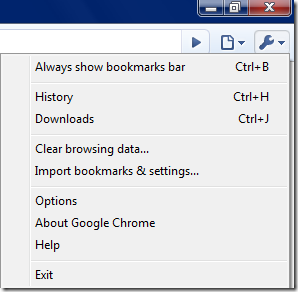
Select option in the settings menu and this will open up the option dialog box. In the options box, select the basics tab (this tab is selected by default).
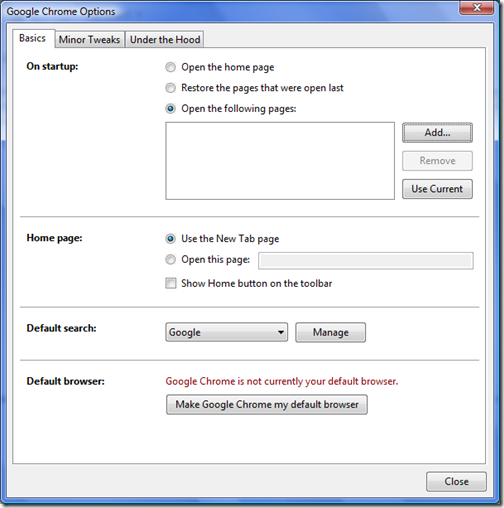
Select the radio button against “Open the following pages” under On startup list. Here you can add the websites you want to open each time when Chrome starts up. Click the add button and enter the URL of the website you want to open. Here you can also add from recently visited sites.
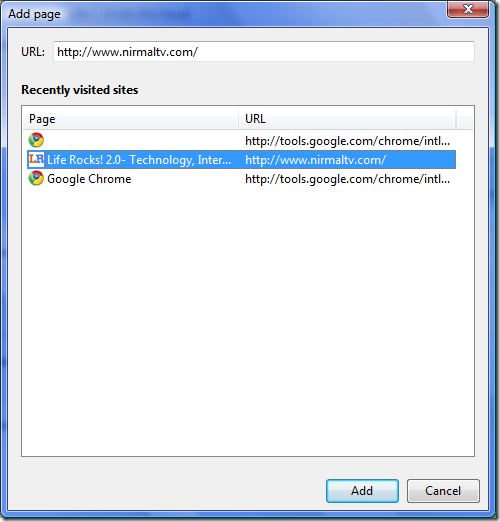
Once the websites are added, click close. From now on each time you open Chrome, these websites are opened by default. This is good feature and very useful one. Comparing this to the feature available in Firefox which opens tabs from last visit, this is better in the sense only your favorite sites are opened.
If you have not downloaded Google’s Chrome browser, you can get it here.





I’ve seen the download links in Google home page. I read many user impressed with the speed and features.
it’s funny, the more i use Chrome (for windows), the more unstable it seems to get… crashes a lot more, can’t handle sites with flash, hangs every time i close a tab… all that to say, i’m switching back to Firefox
Its very good article.but i want to know that how i can make site favorite in Google.
Hi, i visited your site through Google and found it to be informative and interesting. That would be awesome. Really This is great. I think i might try it.