

SecureIt Pro is a useful freeware for people who want to lock the desktop securely with a host of options and features. SecureIt Pro is a security application for your Windows desktop. Use SecureIt Pro to lock your computer when you’re not there or when you are stepped out, to stop unauthorized users from accessing your desktop. It disables the main Windows key functions, like Ctrl+Alt+Del, Alt+Tab, the Windows key, and the Ctrl+Esc key combination.
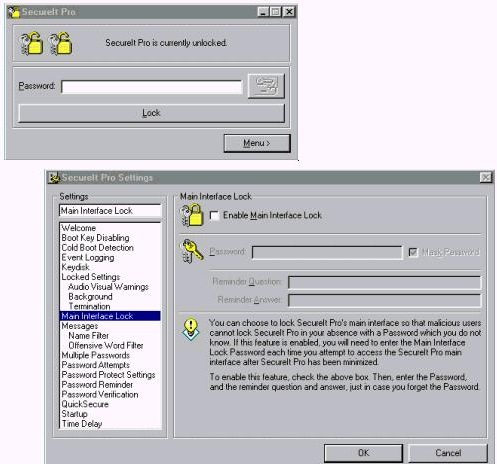
SecureIt Pro can also disable the Windows boot keys and detect for cold boots. It allow other people to leave messages and log incorrect password attempts or it can even hide itself every few seconds.
Advanced settings include;
- Ability to block out offensive words from messages and stop certain people from leaving messages.
- Setting the background appearance while SecureIt Pro is locked
- Determining audio visual warnings to notify people of an incorrect password attempt;
- Setting multiple passwords so that more than one user can unlock SecureIt Pro;
- Log events, password protect the main interface and settings; and even verify that the entered password is correct
SecureIt Pro is a complete free software for desktop security. Visual Basic 6 Runtime files need to installed before installing it.








I am still using Windows secuity setting to lock my desktop while I’m leaving. But I think the advance feature of SecureIt Pro make it worth to try.
does it allow any windows hot key to initiate the lock or any keyboard shortcut.