

Jarte is a free word processor built into Windows which is based on the Microsoft WordPad word processing engine. Jarte is fast and easy to use word processor that expands well beyond the WordPad feature set. Its also a portable word processor whose documents are compatible with Word and WordPad.

Features of Jarte Word Processor;
- Fully compatible with Windows Vista
- Tabbed interface to provide easy access to open documents
- Opens files with extensions RTF, DOC, and DOCX (new default format in Word 2007)
- Fast start up
- Compact screen size
- Export to HTML or PDF
- Send documents via e-mail
- Full drag and drop file support
- Can be run directly from a plugged USB flash drive
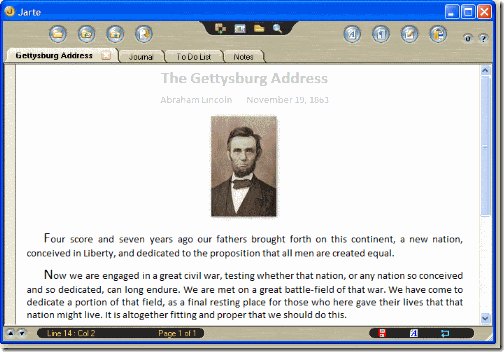
Jarte also allows to insert pictures, hyperlinks, tables, page breaks, equations and other embeddable objects. It also has font formatting where you can select fonts and colors. Users also have complete control over headers and footers in the document. And above all this, Jarte is completely free of cost.








Thanks Nirmal ! I was looking for a Portable Freeware tool , which can work for Office2007 formats . I looked for OpenOffice 3 beta , but its portable version was not there , other freewares are not as good as it looks ! Going to try !
Hey Nirmal Great finding. GUI looks far better then default windows word pad.
My eyes! My eyes!
Is that the ugliest thing you’ve ever seen or what? And it doesn’t have the official Vista look. Or XP’s, for that matter.
I will never understand why Windows developers don’t care about interface design.
review of jarte 3.3
http://snsays.com/46/jarte-33/
I would like free word processing.
Danny Cook
This product is great! I can utilize it for my college work and other things. Maybe it’s because I love to type and the whole idea of word processing but the product Jarte is excellent.