

Remember The Milk for Gmail is a Firefox extension that allows you to manage your tasks in Gmail, add new tasks (and connect them with your emails, contacts, and Google Calendar events), automatically add tasks for starred messages or specific labels. The Remember The Milk extension adds a sidebar located next to your Inbox.
With this add-on, you can customize which tasks are shown (with options to filter based on list, Smart List, tag, location, or advanced search criteria) and decide how to sort and group your tasks. Adding new tasks are also easy job, all you need is to enter your task in the box provided with any tags.
To complete, postpone, delete or view and edit a task’s details, just move your mouse over a task in the list. This plugin can also connect with Google Calenders for events.
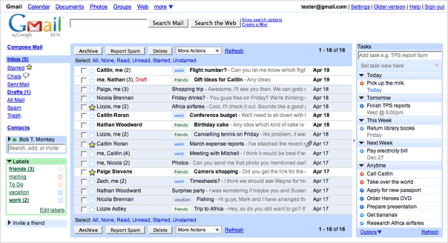
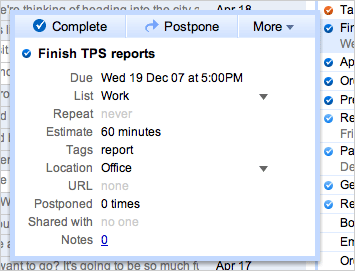
To change the settings, navigate to Settings menu in Gmail and you can see a new tab Task added.

This add-on is especially useful for people already using the Grease monkey scripts to customize Gmail.
Download Remember the Milk for Gmail
Source: CyberNet








This is great. I’m going to be using this one. Thanks for the heads up buddy! 😀
I don’t use RTM, but Gmail 2.0 keeps getting better and better.
It is amazing how well they integrated it into Gmail. I may start using it.
Hey,
Just finished writing about this myself. Will be posting it tomorrow. This is a really great add on.
Loving this extension. I usually hate to keep a tab open just for a todo list. This extension fixes it, saves me a tab. 😀
@BrownBaron,
Welcome!
@Aseem,
I’ll check out your post.
@Shankar,
Its indeed wonderful.
Thanks very much Nirmal. It’s an extremely useful one.
Cheers!
Mani
I am also in need of something like that
Thanks for sharing 🙂
wow…looks like a cool task manager…good find nirmal…keep smiling…
Nice find. Looks awesome to me! Must have for all Gmail users IMHO.