

System restore is a build in feature in Windows which helps to restore the computer to a previous state. The point of System Restore is to restore your system to a workable state without you having to reinstall the operating system and lose your data files in the process.
The normal method to create a system restore is to navigate to from start menu. Start->All Programs-> Accessories-> System Tools-> System Restore. From this menu follow the instructions to create a system restore.
There is a simple method to create a System Restore. All you need is to create a script file with the code below.

Save this file with .vbs extension, which makes it a script file. Now simply run this file whenever you need to create a system restore point. Make sure that the System restore functionality is turned on.
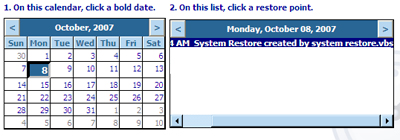
If you select the System Restore, you will be able to see the newly created system restore point.
If you liked this post, please share it using Social sites.






Thax for that information.
For those who like playing with system files, this will going to help a lot. 🙂
System Restore is like undo or ctrl+Z command in word.
When is it useful?
Whenever a download or installation of a new software destabilizes your system you can restore it back to previous stable condition/state.
This is a nice tip, i will test this method.
Cool tip(for the geeks).
And does it save any time? Btw, its VBScript, eh?
Nice tip Nirmal
Thanks for the tip!!
@Sumesh,
Its a VB script and it does save time. 🙂
Very nice tip buddy. I’m going to be using this one, thanks 🙂
please post somebody this script in text format
For data files, never store your data files in the same drive where you install your OS.This is a general norm.
@alxgudo,
In case you are not able to view the script, here it is-
rp = “System Restore created by ” & Wscript.ScriptName
GetObject(“winmgmts:\\.\root\default:Systemrestore”). CreateRestorePoint rp, 0, 100
@indyankk,
I didn’t understand your point here. Has this anything to do with System restore or a general point?
Thanks for a cool tip Nirmal .
Hey where’s my comment gone…anyway nice tip and stumbled!
Nice tip Nirmal really neat, stumbled.
@Mayank,
I think that comment was not submitted. 🙁 I didnt see your comment before, not in spam also. Thanks for the Stumble. 🙂
@Keith,
Thanks for the Stumble. 🙂
I don’t create restore points so often, but I never knew that it was so simple to create one (especially with this shortcut).
Stumbled this up!
I’ve started using this from this instant 🙂 Thanks a lot for this tip.
Thanks for the usefull information Nirmal. 🙂