

Bookmarks is an easy way of remembering website we visit often. There are chances that Firefox may crash because of a new add-on installation, theme installation or any other reasons. It is always good to have a back up of data especially the bookmarks in Firefox. Taking a back up of bookmarks is pretty simple process and basically there are two methods to back up your Firefox bookmarks;
Method-1:
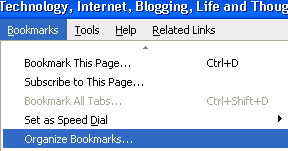
Go to Bookmarks->Organize Bookmarks in the main menu.
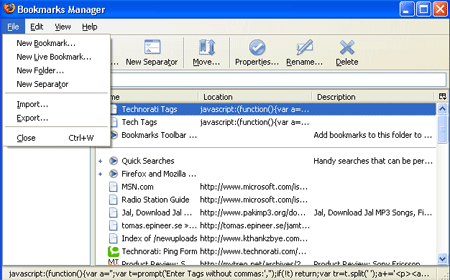
This will open up the Bookmarks Manager window. In this window you can see all the bookmarks saved. Go to File->Export and save the file in the preferred location. The file will contain all your bookmarks and will be an .html file. Whenever you install Firefox in another PC or re-install in your PC, you can import all the bookmarks through File->Import and select the option From File in the Bookmarks Manager.
Method-2:
Second method is directly taking a back up of the bookmarks.html file from the profile folder of the Firefox application. To do this navigate to this folder-
C:\Documents and Settings\<your profile name>\Application Data\Mozilla\Firefox\Profiles\ati9z0wb.default
In this folder you can find a HTML file by name bookmarks.html. Take a copy of this file and paste it in the desired location. Thats it, next time if you install Firefox, import this file using the steps mentioned above.
Update: The folder ati9z0wb.default may be different for different profile as pointed out by Benedict.








Good information, thanks for sharing. 😆
I think there is third method too :
Using Google Browser Sync
Wow cool trick, so any idea about how to import / backup browser history and cookies in firefox?
@Kuanhoong,
Thanks for the third method. 🙂
@Rishi,
If you want to back-up History and cache, you can use the backup tool- MozBackup. This can back up bookmarks, mail, contacts, history, extensions, cache etc in Mozilla and its a freeware. 🙂
Fourth method can be Foxmarks addon.. For syncing bookmarks online.. I feel it’s better than google browser sync if you want to sync only bookmarks..
Nirmal, Thanks for writing it! I have a small modification on Method 2. You won’t really see folder “ati9z0wb.default” it is randomly generated name and varies based on the user profile.
@Nirmal
thanks for mentioning about Mozbackup …would be useful for me…
Wow cool, Thanks for informing about it! 🙂 So when is its review coming on nirmaltv.com ? :lo:
@Deepak,
Thanks for the info on the add-on.
@Ben,
I too had that doubt, but then could not check it. Thanks for informing.
@Rishi,
May be you can do a review of it. 🙂
I have a lot of bookmarks on Firefox, will have to back up them when I reinstall Windows. Nice handy tip there. Thanks for sharing.
I was thinking of backing up my bookmarks for a long time as tooo many are there . Read this post and did it right now 😀 . Thanks for sharing this 😀
I’m a big fan of the bookmarks toolbar up top and I always get annoyed when it gets cleared occasionally. I’m lazy, I like to just click an icon. Any way to know why that happens?
Thanks for this post. Exporting bookmarks is really convenient when I need to import the list onto another browser.
Thanks for the important information.
I bookmark my important links at delicious but still there are situations when this is needed. 🙂
Nice trick Nirmal !
Very useful information Nirmal , thanks for sharing 🙂 . Your advices , tips and tricks about Firefox are very useful and I like the way you present them , keep it up .
Nice tip! I mostly prefer backing up the whole profile instead of only bookmarks. My Firefox profile is very dear to me! 😎
Nice posting!
I have been reading about the online backup and storage industry for a while now. It is becoming a commonly accepted technology these days.
For online backup news, information and articles, there is an excellent website:
http://www.BackupReview.info
This site lists more than 400 online backup companies and ranks the top 25 on a monthly basis.
It also features a CEO Spotlight page, where senior management from the industry are interviewed.
Cheers,
Hi Nirmal! Nice Tips! I also want to contribute 1 method. I’m using FEBE to backup every elements of my FF. 🙂
Nice Post dude , didn’t knew about Method #2 Just checked it out works like a charm 😉
@Ken Xu,
Thanks for that Add-on information.
@Minty blog,
Glad you know that you liked it. 🙂
Nice Info. Thanks
I only realized the importance of backup a few months ago. After that I regularly backup bookmarks and also upload them to del.icio.us to ensure that they are never lost.
Hi Nirmal….I use Foxmarks.
Btw, I was wondering whether you could write a tut on how to put those little icons showing country, OS and browser, in comment meta section.
Loved the tutorial on social bookmarking icon, thanks…
@TechZilo,
Those icons for country, OS and browser are displayed with a plugin for WP- Firestats. Installing the plugin with show these stats.
What about SyncMarks addon?
( http://www.artcompedia.com/xmore/ffxext/syncm.html )
Syncs over http,https,ftp with a server. Local saving also. Formats used to back-up/sync are xml or html. Can copy Firefox bookmarks into Window’s (Internet Explorer’s) favorites.
yeah… you rock!!! tnx for this cause im really having a hard time working on my home pc and in my office workstation cause i want to see my bookmarks in my pc at home and in my office…
can i ask if its possible to combine booksmards?
Thanks a lot!!
Method-2; is not usable in Firefox 3, as bookmarks.html is not updated… AFAIK
Thank in this help.
thanxs guys for the help
but i managed to find it on VISTA (whos interested) on the following location
drive(c):\Users\XX\AppData\Roaming\Mozilla\Firefox\Profiles\6c86w2fa.default
cheers
backing up bookmarks.html did not help me at all! Instead, I had to back up about 6 files of the Mozilla\Firefox\Profiles\ directory. So instead of backing up the 6 files, I just backed up the Profiles directory.
What gives? How are you people backing up when all you are doing is saving 1 file bookmarks.html (except for 1 person above). Thanks,
Hi,
Thanks for the good info however if I import my bookmarks from Internet Explorer will it completely overwrite the ones in Firefox or just add the ones I don’t have and rewrite the ones I do? Anyone? Anyone?
Thanks. This was helpful to me.
Great information, excellent advice.
I’ve written something very similar to this – a step by step guide for Firefox in vista. It can be found here:
http://www.theclayto.com/backup-export-firefox-bookmarks/
Thanks again for the information!
Thanks very much Nirmal
Hi Nirmal…
Nice piece of information and your blog is awesome and impressive. I m also surprised you blog stood first for my Goog search ” how to backup firefox bookmarks”
that means really wonderful thing to achieve … Keep going and I ve added ur Feeds to my News gator….
Thanks for this Nirmal.
the last time, i tried backing up by copying the whole profile folder, and make that profile as the primary, then delete the original profile folder. it was ok since it was a new computer so i haven’t really done anything on my firefox. so it was really like using the FF on the old computer (all bookmarks, add-ons, plug ins are there)
my question, since now i’ve been using this computer for quite sometime, like The Real Proxy’s question above, is there any way that we can combine bookmarks? I wanted to import bookmarks.html from another computer but afraid if i use method 1 & 2, this will overwrite my consisting bookmarks.
Thank you soooooooooooooooooooooo much buddy! I was really anxious about this matter… Thanks for your post!
It’s 1000000% Usefull!!!!
Again, Thank you very much!
Regards, Mehrab
I have tried Method-2 and bookmarks.html. But only first few bookmarks are found. Recent bookmarks are not found.
This information is really great,
It works perfectly,
Thankyou Nirmal
You could also sign up at http://www.my-favorite-websites.com/ then import your favorites, then you have access to them where-ever you go, no need for backing up.
thank you so much, i’ve been wondering how could I backup all my firefox stuff
Hello, I have a question: Is it possible to make Firefox to do backups only 5 times a year? I saw it in a friends pc. When we checked up his settings, a small window popped up, and said: 5 times. My friend said: it means, the system do backups 5 times per year. And we had an argument about it… Because I think, this number doesnt mean, backups happen 5 times yearly.
Thanks
Thanks, It helps me so fine. For long time I was thinking for backing up my bookmarks but I didn’t know how
thankx a looooooooooooooooot
Thanks. I have 2 separate installs of FF (look it up) so this can help.
Xmarks, was Foxmarks, allow Bookmarks from multiple computers. As yet no way to join Opera and Firefox bookmarks though. I think if you install Google’s Chrome it finds both though.
Good luck,
Joan in Reno
thanks!
Incase any one need a free online backup space to backup all their files for free i strongly recommend this site http://www.free-file-backup.com .Up to 10GB free online backup space is available here
I want to take a backup from office PC and add this new backup to my home PC but when i restore it deletes all previous bookmarks ..any help?
I use a new MacBook Pro. I see NO instructions (that work) on how to backup my Firefox 3.6.3 BOOKMARKS.
thanks for the tip..
I’ll be formatting my PC soon so this will be very useful to me. A big thanks to you!
I’m want migration to linux..and want backup my bookmark in windows .. 😀
thanks for share the great information.i’ll format my pc this information will be very useful.