

If you wanted to shutdown your PC after a specified time, Auto ShutDown is the software you are looking for. Auto Shutdown works on all versions of windows and is only 0.1 MB in size. The installation is very easy and so is the setup.
All you need to do is to set the time when you want the system to shutdown. There is option to force shutdown which will close all running programs without saving data. With “Remind me” option, the user will be reminded about the shutdown. A password can also be set to the options so that once the time is set and the program is in hide mode, it cannot be disabled unless you type the password.
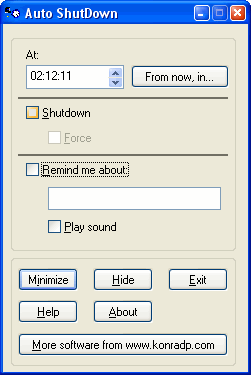
Although there are lot of software for shutdown, this program is simple because of the fact that it consumes very less memory and is also a freeware.
Click here to download the software.
 Technorati tags: AutoShutdown



You can also use a scheduled task + the shutdown.exe command (built-in to Windows XP)…but this is very nice for the not-as-geeky users 😉
Thanks a nice simple software. A good reminder too that I need to shutdown my computer and enjoy the real world out there 😀
@ Rob Dunn,
There are tweaks in XP for autoshut down. But this is useful for people who dont know about these tweaks. 🙂
Try this command
shutdown -s -t 20
This will shutdown the system in 20 seconds. For more info…
http://www.microsoft.com/resources/documentation/windows/xp/all/proddocs/en-us/shutdown.mspx?mfr=true
Btw, I could not test it – I am on Linux
I used to use another freeware called AMP WinOFF. Its less than 500kb and provides a lot more optoins, like disonnecting your internet connection, logging off, restarting, putting your computer in standby or hibernate mode.
Download it from http://www.ampsoft.net/utilities/WinOFF.php
@Binny,
Thanks for that tip. I’ll try it out. 🙂
@Pallab,
This software is 300kb, but has less options than the one you have suggested. I’ll definitely try it out.
I too use Amp WinOFF. Like it for the options it gives… 😉
hey nice theme man, if you dont mind i have a suggestion.
Header image looks distorted (i didnt get the right term, i think u got what i mean) becoz of the jpeg compression. you can use a 10px PNG as header background and overlay logo on that. It saves loading time.
Much much thanks for the suggestion, my friend! It may not mean much, but you’re headed into my blogroll! Thanks again my friend! AnitoKid at http://www.anitokid.blogspot.com
well this one is fast and simple but i thnk u shld mention all the methods and other software also…just a suggestion frm myside.
@Abhishek,
Nice idea, but there are lots of softwares for this purpose and listing all of them is not possible, otherwise I would have included. 🙂
I use ecounter which can perform many task like hanging internet connectio etc.More on ecounter E counter