Tag: Windows 8

Outlook 2013 in Metered Connection

Outlook 2013 in Metered Connection

May 7, 20130 Comments

Windows 8 has been made for tablet devices as well apart from normal desktops, laptops and ultrabooks. There are quite a lot of settings available for tablet use. We had previously covered about metered connections and air plane mode in Windows 8. With the release of Office 2013, there are many features which are made [...]

Review- Metrotube for Windows 8

Review- Metrotube for Windows 8

May 4, 20130 Comments

Similar to Windows Phone, almost all of Google’s services are missing in Windows 8 except for search and this includes YouTube as well. When you have a Windows 8 tablet, you might need a good YouTube app for watching videos. Although official apps are missing, there are quite a lot of good alternatives available for [...]

Acer Aspire P3- Ultrabook Convertible

Acer Aspire P3- Ultrabook Convertible

May 4, 20130 Comments

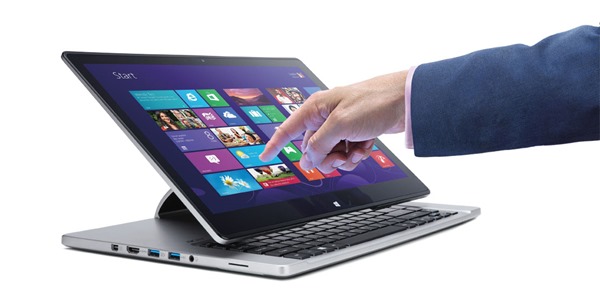
Acer today announced a host of new devices running Windows 8. We covered about the new all-in-one laptop Aspire R7 and here is anther convertible ultrabook- the Aspire P3. Aspire P is the first convertible Windows 8 Ultrabook from Acer which can be used in different modes based on your needs. You can use it [...]

Acer Aspire R7- Desktop, Laptop and Tablet Experience

Acer Aspire R7- Desktop, Laptop and Tablet Experience

May 3, 20130 Comments

Acer has announced a new Windows 8 powered laptop which is basically an all-in-one device which can be used as a desktop, laptop and also gets you the tablet experience. Aspire R7 is a revolutionary 15.6-inch notebook that will redefine the touch and type computing experience and features a Full HD 1920×1080 touch screen. Aspire [...]

How To Boot Into Windows 8 Safe Mode

How To Boot Into Windows 8 Safe Mode

May 2, 20130 Comments

Safe mode is the diagnostic mode for Windows which allows users to repair and fix and issues with the normal working of the PC. Generally to boot into Safe mode, you need to press F8 while Windows is booting. Also, in a multi-boot environment with multiple versions of Windows installed side by side, the F8 [...]

How to Take Screenshot on Windows 8 Tablets/ Surface

How to Take Screenshot on Windows 8 Tablets/ Surface

May 1, 20130 Comments

Windows 8 has quite a lot of new features including the start screen and the new Windows store. Moreover, with the release of Windows 8, we are seeing so many new tablets running Windows. Generally when you want to capture screenshots on Windows, you press the Print Screen button and paste the image in any [...]

[How To] Add Your Favorite Folder or Program to My Computer in Windows 7 and Windows 8

[How To] Add Your Favorite Folder or Program to My Computer in Windows 7 and Windows 8

April 27, 20130 Comments

My Computer or Windows Explorer is one of the most commonly used program on your Windows. My Computer (or just Computer in Windows 7 and later versions) allows you to access your drives and devices connected to your PC. The left sidebar also allows you to access libraries and other favorite folders. Since the Computer [...]

How to Make Windows Select Wired Connection Instead of Wireless Connection

How to Make Windows Select Wired Connection Instead of Wireless Connection

April 23, 20137 Comments

Normally when your laptop or desktop (with wireless in-built) is connected to a wireless connection and you connect a wired Internet connection, the network usage will still be from wireless connection. There might be instances where you want to be connected to wireless connection but want to use the Internet from a wired connection. You [...]

10 Awesome Windows 8 Themes Worth Trying

10 Awesome Windows 8 Themes Worth Trying

April 23, 20131 Comment

Although Windows 8 has many changes including the new start screen, file explorer, task manager, etc., the customization options are more or less similar to Windows 7. The extension of core theme files have changed from Windows 7, but the original Windows 7 themes are compatible with Windows 8 as well. Since Windows is the [...]

[How To] Create a Network Bridge in Windows 8

[How To] Create a Network Bridge in Windows 8

April 22, 20130 Comments

A network bridge is software or hardware that connects two or more networks so that they can communicate with each other. The two networks can be either LAN  or Wireless network (WLAN). People with home or small office networks generally use a bridge when they have different types of networks but they want to exchange [...]

Android

Wirelessly Transfer Files between your Android and Mac

Wirelessly Transfer Files between your Android and Mac

Published on June 17, 2013
June 17, 20130 Comments
How to Clear Cache for all Apps in Android

How to Clear Cache for all Apps in Android

Published on June 17, 2013
June 17, 20131 Comment
Protect WhatsApp (Messages) with a Password using WhatsApp Lock

Protect WhatsApp (Messages) with a Password using WhatsApp Lock

Published on June 17, 2013
June 17, 20130 Comments

Windows 8

Windows 8 Activation Errors

Windows 8 Activation Errors

Published on June 18, 2013
June 18, 20130 Comments
How to Create a System Image in Windows 8

How to Create a System Image in Windows 8

Published on June 17, 2013
June 17, 20130 Comments
Things to Know before you Upgrade to Windows 8.1

Things to Know before you Upgrade to Windows 8.1

Published on June 6, 2013
June 6, 20131 Comment

Tutorials

How to Enable Two Step Verification in LinkedIn

How to Enable Two Step Verification in LinkedIn

Published on June 4, 2013
June 4, 20130 Comments
[How To] Enable Two Step Verification in Evernote

[How To] Enable Two Step Verification in Evernote

Published on May 30, 2013
May 30, 20130 Comments
[How To] Enable Two Step Verification in Twitter

[How To] Enable Two Step Verification in Twitter

Published on May 23, 2013
May 23, 20130 Comments

Windows Phone

IPL 2013 Apps for Android, Windows Phone and iOS

IPL 2013 Apps for Android, Windows Phone and iOS

Published on April 2, 2013
April 2, 20131 Comment
130000 Apps in Windows Phone Store

130000 Apps in Windows Phone Store

Published on February 25, 2013
February 25, 20130 Comments
Siri like Personal Assistant, Indigo for Android and Windows Phone 8

Siri like Personal Assistant, Indigo for Android and Windows Phone 8

Published on February 25, 2013
February 25, 20130 Comments

Back to Top