

Microsoft’s new decision search engine, Bing which was released this week is already in discussion. Many webmasters have claimed that they have started getting good traffic from Bing. You can submit your website or blog to Bing and start getting traffic from Bing. Once you submit your website, you will need to verify it. This feature is available in Bing’s webmasters tool which can be accessed from the extra menu at the top right hand corner.

How to Add Website/ blog to Bing:
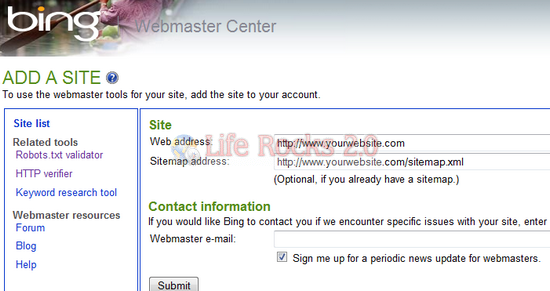
1. Navigate to this URL if you want to submit your website to Bing. You will need to sign in with your Windows Live ID to access the webmaster center.
2. Enter the website URL and also sitemap URL (sitemap is not mandatory, but it is highly recommended to add one).
3. Next step is to verify your website and this can be done either with XML verification or HTML meta tag verification. You can get more details from the help center.
4. Once your website or blog is validated, you can see the complete details of the website submitted like number of URLs indexed, any issues with the crawling etc.
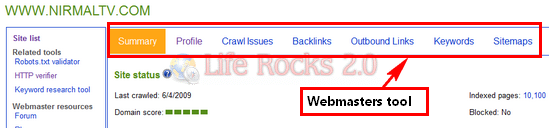
The webmasters tool allows you to check crawl issues, back links, outbound links and also sitemap.








Hi Nirmal, I didn’t even know Bing existed until I started seeing traffic coming from it. Apparently, I don’t need to submit this particular website (but need to submit others).
Thanks for this Nirmal. Recently added/updated my site on Bing!
thanks nirmal. really useful for bloggers / webmasters.
Thanks for this info, however I don’t need it as it’s auto transfer from Live to Bing. I really in love with Bing.
I logged into the webmaster tool and Realize my blog is already listed there. probably because I submitted to MSN earlier..
Thanks! You would think Bing would make it easier for people to submit their websites, especially since they are trying to compete with Google.
I’ve been looking for this link for 20 minutes now.
earlier it was windows live web master tools
Nice, thanks!
Hi…i want to know how many days will it take for a new blog to get indexed in Bing and get traffic from Bing search??
Please help me
Google has pretty much fully indexed my blog (about 50 posts) but bing has only indexed about 10 pages. Why is bing so slow?
Great !! I was really looking for ways to submit to Bing
Thanks for this Nirmal. Recently added/updated my site on Bing
It is great that it is possible to submit to BING. it is new, so probably it doesn’t know my website yet, and now it does! Thanks!
So far Bing only has my site’s homepage indexed and for some reason the other pages are not being indexed.
Thanks for the post, I cant get indexed on bing.
Regards,
Bodybuilding Supplements | Magic Tricks Revealed
tried 5 times but havnt got the permission yet
Thanks for the information.
I already have links to my website on bing.com , the only problem is that am not getting a lot of traffic from it.
Ok thank you for this interesting guide bro…
You have a great blog here, really helpful. Very well written I will be bookmarking your website and subscribing to your feed so i can regularly read articles of this quality.
Very nice article and useful too ,kip it up .
Best of luck.
This is the very useful information
Thanks for share
Looking for unique web traffic.Know How to get Unique Visitor ## http://bit.ly/GVVlFg
This page is a joke, when you hover over the links it gives ads, and that’s the only place you can go — you can’t get to the bing pages.
Thanks Sir for guide to submit in Bing
Thanks, You helped me in getting my website indexed in Bing
I submitted to index my site using cpanel attracta tool. After submitting to index from attracta tool we manually need to submit to index or not.
Hi Nirmal, I didn’t even know Bing existed until I started seeing traffic coming from it. Apparently, I don’t need to submit this particular website (but need to submit others).
nice article very well explained, i must share this to my friends.
Thanks to the author for sharing such an amazing article, its very impressive.
thanks for sharing it with us, Now i can also get traffic from bing.
Thanks for this usefull info…and i also want to submit my blog to bing.Hope it works for me and thanks again for this useful post.
thanks for sharing this useful tips..it’s very useful for us
very nice representation and i understand how to submit website to bing and thanks carry on good work.
I think now nobody use of other search engine so don’t need to submit on other search engine.
Hello friends, how is all, and what you desire to say about this article, in my
view its in fact amazing in favor of me.