

Zune is a great Digital Media Player from Microsoft and we own an 8GB Zune player. Recently Microsoft updated Zune firmware to 3.0 with added features. After installing the new version, Zune player got hang once while navigating through the photos. Unlike mobile phones, Zune does not have a power button, so we searched articles on how to restart it. Microsoft has a knowledge base article on how to restart Zune device.
To restart the Zune device, follow these steps:
- First unlock the device using the sliding button on top of Zune.
- Press and hold the Back button
 while you press the top of the Zune pad. (see the image below)
 while you press the top of the Zune pad. (see the image below)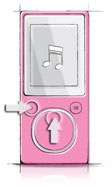
Img Credit: Microsoft
This method applies to all versions of Zune- 4GB, 8GB, 16GB, 30GB, 80GB and 120GB. Check out our Zune unboxing photos at Flickr.








Thanks for the tip.. I was not able to see the Image.. I guess there is a problem??
Thanks for the tip! It worked like a charm
What if it’s already on that loading screen where it says Zune and it has that power up bar? Mine froze in the middle of that and now it won’t restart. Do I have to wait until the battery dies?
My zune is stuck on like i think the loading part… it has been this way ever since i truned it on this morning and now it is 8 in the evening… so can any body help me…