

We have seen lots of free online photo editors each having its own unique features. Online editors are improving such that in future, we may not actually need a installed software for editing photos. Sumo Paint is another online photo creator and editor which has pretty good features. Sumo paint offers powerful tools for creating and editing photos inside the browser.

You can also import images from online storage account Snap. But it would have been better if there was photo importing from Flickr and Picasa like other online editor Splashup or Picnik. Sumo Paint looks extremely similar to Splashup in its looks and features.
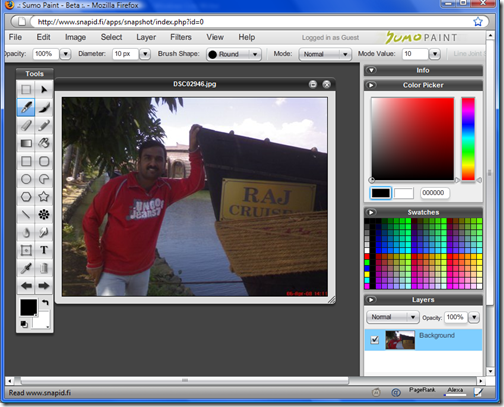
After editing images, it can be saved back to computer or saved to your online account with Sumo Paint.








Looks pretty much like a desktop editor, could not make out the difference at first.
Great Site For Online Image Editing…
Would Like To Mention Similar Sites…
http://www.pcdrome.com/2008/09/great-sites-for-online-image-editing/
-Anurag R.C.
http://www.pcdrome.com
I am extremely disappointed in this thing, I mean it had potential, yes, but you could never get any pictures off of photobucket!!!! Yes, I’m sure you can save the images to your computer, but I can’t because, well, it’s not my computer! So yeah, it would be nice if you could somehow work out that bug. Oh, and you can’t even copy the image off the website! Nothing shows up on the screen when you paste! No, do not tell me I might have missed something because I know I didn’t because I have been doing this for over 2 years, so I gots da experience.