

Facebook is one of the popular social network after MySpace. Unlike MySpace, which allows customizations for all areas, Facebook does not have much customizations for your Profile and are limited. But still you can do some customizations to your profile. Facebook Expressions is one such application which can give a new look to your Facebook profile and layout.
Expressions are similar to wallpaper for your Facebook profile. The Expressions application is added through Facebook and allows you to display eye catching designs (Expressions) on your profile.
How to add expressions?
1. Navigate to Facebook Expressions and and install the application on your Facebook (you need to login to add the application).
2. Once you install the application you can come back to the main website where you can then find an Expression you like by browsing the categories on the left.
3. After finding an Expression you like, click the “Add to Profile” button. This will take you to your Facebook profile where you will see your newly applied Expression.
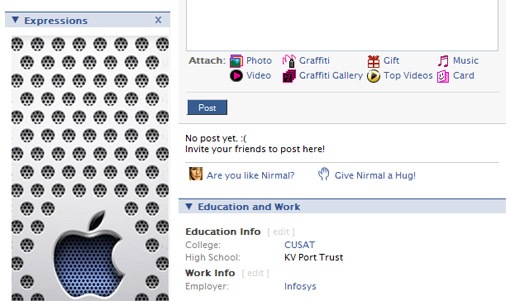
You can see Apple expression on my Facebook profile.There are hundreds of expressions with which you can customize your profile.







A Facebook app.. Cool! Will give it a try 🙂
how is putting a picture on a profile Customization of Your Facebook Profile, google was too generous with you.
so how do I get rid of it now? I’ve tried deleting the application but it “does not exist” when I go to my applications.
How do I get rid of Expressions…I deleted the program, but the background still shows up on my profile? Thank you so much
wow!! its cool !! i want to try it !!!
nice wallpaper. Thank’s a lot for info sharing ^_^
how to do facebook layouts and themes???
just give me steps to do it properly
i tried this..but you yourself only see the customized page on your computer, try to log in another acct in another computer and view your account that you customize, theres no changes..
Here is another great tool that you can use to customize facebook. http://facebookmarketer.blogspot.com/2010/02/new-how-to-customize-your-facebook.html
Wow! There’s a flood of “customize Facebook” options. I’ve kind of looked through them all and I prefer PageRage. Its the only one I’ve actually tried, but it seems to be the most reliable. The plug-in doesn’t break, which I’ve heard of other applications. So when Facebook does a re-design, your profile doesn’t look all janky. It makes facebooking more fun… and its FREE!
http://www.pagerage.com
Thanks. It’s very good post. I will try it
I am extremely new to the net and needed to read up on this subject. Thought it was a well written article very well written and informative. I will surely be coming back to your site to read more posts as i really enjoyed this one..
I have tried facebook expressions, its ok , a seemed to slow my computer down , and the customer support was slow … i am using another application that is great , check it out here http://www.squidoo.com/free-facebook-themes
Thanks lot for your post. Customize facebook profile will stylize our facebook
Most of this content is largely out of date now. Facebook try using My Tab to customize your Facebook business profile: http://www.facebook.com/revealtab
Apologize for this noob question. Could you let me know what this blog template is? I truly like it. Or is it customized template, maybe? I believe it can be a decent choice for adsense too. I’d really appreciate it if you are able\will tell me about it. Thanks.
I was looking around and found this website as well for customizing profile pics http://biggapic.com