

The best feature of Firefox is the support for 1000s of Add-ons to increase the features. Sometimes Firefox fails to start up because of some add-ons. When Firefox is opened, it runs in background and it is present under the processes list in task manager but is not listed under applications that are running. This is a common problem with Firefox and the solution is also simple.
1. First go to Task Manager and end process “firefox.exe”.
2. Go to programs -> Mozilla Firefox -> Firefox (safe mode)
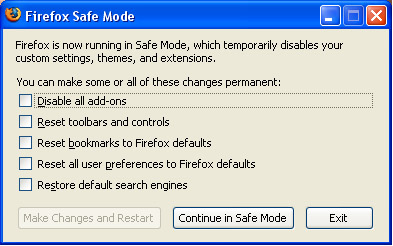
3. In the check list select for defaults and disable all add-ons.
4. Click make the changes and restart.
Now Firefox will start normally without any issues.






Good tip (though making a new profile with the firefox.exe -P command on run is also possible, as new profiles don’t have extensions).
I never use more than 5-6 extensions, because more will only make an otherwise decently fast browser pathetic and slow.
Fortunately i never faced such a problem yet…bookmarked for future references
@Sumesh,
Thats also a good way, to create a new profile.
Even if you use only 5-6 add-ons, an update in a single add-on can cause firefox to stop starting up.
I tried to uninstall and reinstall Firefox, still its not opening the brower, even the safe mode option doesnot pull up any thing. deleted every thing from the Firefox website stil nogo, any other sugestions please email me. [email protected]
I have the same problem. Even Safe Mode does not open. I had some viruses. I believe that is when it started. I have removed the viruses but still no Firefox. I have uninstalled it and re-installed (fresh download) but no luck.
🙁
HELP. I will not use IE. Also (may be related), if I search with IE, Yahoo, when I click on a serach result, it takes me somewhere else. Not where I clicked.
>:
Thanks a lot for this simple but very effective tip.
I tried backing up profile , updating firefox ..etc.. But nothing worked..
same issues here, will not start up, not in task manager, safe mode doesnt work. Any real answers anywhere.
this doent work man
Its not working at all for me!
i googled solutions for the problem and tried them all, none worked.
also seems like alot of people are having this same problem lately!
Nirmal you are the man! Firefox started fine.
Hi!! guys!!! we have a very same prob!!!my firefox is not starting….i think its a virus infection…
But i have the solution…if u have the same prob as mine….
It works for me but i can’t guarantee if it will work for u. but at least, i just want to help….
I try to uninstall firefox but it simply can’t. it is because of malware or spy ware. so clean up your pc first. I like avg but their 8.0 make my comp slow so I try AVIRA.try to kill the process of firefox if it is still running…check ur task manager…..
After Cleaning your pc…
If you cant uninstall firefox. Just delete its directoties in the Program files folder.
Also delete the shortcuts in your desktop or quick launch.
Then download the latest version of Firefox….
Install it……And used again!!!! Gud luck!!!!
Tell me if it works!!!! [email protected]
yeh i tried safe mode but its not even opening in safe mode also
hope u inform me on
http://www.v2tricks.co.cc
My firefox (3.05) did not start either and had tried everything. What worked though, was to copy the mozilla folder from application data from another computer that mozilla worked fine, and paste them to my computer. Hope it helps
It’s just a bug, go to Task Manager and end Firefox directly from the Process Tab, then go to Programs – Mozilla Firefox – Safe Mode and check “Disable All add-ons.” That should make it work. It did with me at least. 🙂
@Rich
I have the same problem. The workaround didn’t work for me, and when I use IE, after a simple google search, when I click the link I want from the results, I’m redirected to some other site (usually some web-based yellow pages thing).
@Everyone
Does anyone know if this some sort of virus, or something else? Please help. I HATE IE and love Firefox, but I just can’t use it right now. Thanks in advance.
If you are getting redirected then, yes, you have a virus. Avira should take care of that.
Hey all-
After having used Firefox for approximately 6 months- 1 year without any major issues at all, I too began experiencing this problem. I am currently using Firefox 3 , w/ a number of different add-ons (although, as i mentioned above, Firefox functioned just fine, for quite a while, even with a lot of different add-ons installed.) I have, however found a SOLUTION that works for me:
MY SOLUTION:
-So, i double-click the Firefox shortcut on my desktop, but Firefox never starts up. I wait a few minutes to be sure (Firefox usually takes some time to start running anyway)
-I CTRL + ALT + DELETE to open TASK MANAGER
-Find Firefox.exe
-Highlight it
-Click END TASK
-Next thing i do is click START to open start menu
-Go to RUN
-Type in firefox.exe
-Click OK
Again, give it a few minutes- even when Firefox is working, it still takes a little to start up (at least for me it does).
-Sometimes this still doesn’t open it, so i go through the whole process again (END TASK- RUN- FIREFOX.EXE…etc). If it didn’t work that first time, it usually will definitely start up this time- if not, give it one more try. This can get frustrating for sure, but at least you get to use Firefox
SOME WEIRD RANDOM TIPS (that i have noticed- for whatever reason[s], seem to work):
-most importantly, make sure you end ALL PROCESSES of firefox.exe that are running- sometimes i have noticed that i have 2 of them running, and had missed one of them. They all have to be closed out/ended for this to work
-This tip is strange, and it technically makes no sense, but i swear it works. I’ll explain it with an example: Lets say my very first attempt at opening firefox was by double-clicking the desktop shortcut. Then, the second time i use RUN. Then, If there is a third time, i will try another way- say, by clicking the Firefox shortcut located on my START menu- in other words, every time i try to start up Firefox, i use a different method/shortcut. (Sometimes i use RUN the first time, desktop shortcut 2nd time, and so on). Yes, i know- just because they are all LOCATED in different areas, it doesn’t make a damned difference- they are all the same thing- firefox.exe- but seriously, what have you got to lose by doing it anyway? My mind has made me believe that it somehow makes a difference, haha.
-And, lastly, yet another strange thing i have found that helps. Don’t be doing other things while waiting for Firefox to start up. For instance, sometimes i may be in Photoshop working on something. Then, for whatever reason, i need to open Firefox- if i double-click the shortcut or whatever, and then go right back to messing around in Photoshop while Firefox is in the process of trying to start, it almost never starts up. Im not sure why. Even if im like cleaning out folders- or doing ANYTHING really, while Firefox is attempting to get going, it seems to, like, lose focus or something, and won’t start up. I have found that, if i stop doing whatever else it was that i was in the middle of doing, and just wait patiently (bleh!), then Firefox is more likely to start up. Again- no reason as to why, or how, this would affect anything, but it seems to work.
Hope this helps SOMEONE at least , haha. Good luck!
The comment by Minoas helped me.
Firefor was not starting up for me. Reinstalling did not help and also the first time I tried this tip it did not work. My problem was whenever I launched firefox, it ised to prompt me for ‘restore previous session’ or ‘start a new session’ but nothing happened after that thought there used to be a firefox.exe entry in the task manager.
Before you try this tip, please make sure that you KILL THE FIREFOX INSTANCE FROM THE TASK MANAGER.
Thank you.,
Vinay.
hey guys… i got infected and spent all day cleaning my system. when i was done, FF was doing the same as everyone described. I have my UI highly customized and didn’t want to lose everything. So, what I did was simply start in safe mode and then disabled my least used add ons. (I have many). Started back up with no problems at all.
Thank you friend.Now,It is working perfectly.Nice solution.
@EVERYONE Who Uses AVIRA.
Theres a great product called AVAST! and its FREE ($0.00)
my firefox safe mode wont open either
WAT DO I DO??????
same issue here… will not start up, not in task manager, safe mode doesnt work.
To Ctrl, alt, delete. Then click on the PROCESS TAB and search for firefox.exe (just look down the list). That’s where to disable it not the Applications where I was looking.
Yep, same thing here. I’ve tried everything. I am virus free, I have no add-ons, and Firefox ran fine before. Now all of a sudden I can’t open it; I get a window telling me it crashed and asking if I want to restart Firefox and offering to send the details to Mozilla. Even after completely uninstalling and reinstalling it does the same things and I can’t even get it to start in Safe Mode.
@WFarr:
Avira is a great product and it’s free too
Ok guys found the solution…
Open with safe mode and tick box, disable all add-ons.
Then click apply and restart, then your normal firefox should open. But you will notice the annoying thing that you havent got any add-ons and if you try to re-instal them it will not work, simply go to tools-add ons, and enable the ones you need.
If you cant open in safe mode, then you already have a firefox.exe process running, go CTRL+ALT+DEL, processs, end task the firefox.exe, then safe mode should open. If oyu have tried opening firefox multiple times, then small 2kb processes run at the bottom waiting for the main one to execute, end tast all of these also.
Thank you for your help. So far all is well. You are the first one whose advice has helped. I’ll wait and see whether it keeps on working; if not, may I turn to you again?
I can’t start Firefox Safe mode and it does not show up in CTRL + ALT + DEL. I’ve had BitDefender installed and I suppose I have no virus. I unistalled Internet Explorer in the past so I basically have no other browser to access the internet. Help!
Firefox does not start up (neither regular or safe mode). It does not show up after CTRL + ALT + DEL. I unistalled Internet Explorer so I have no access to the internet from that computer. Help!!!!
Add me to the list.
No FF, no FF safe and it does not appear in Task Manager.
Use Opera in the mean time.
IE6 is never really gone. Look for the IE icon under IE in Program Manager. If you want to use IE at all, download IE8. It is safer than IE6.
While we look for the fix.
same here, firefox is not showing up anywhere even in d task manager…….n d stubborn lil bugger wont budge…..need help….i don wana try anything cuz i hav customised firefox 2 my needs n im afraid dat it will all go away!!!……HELP!!!
am I the only one who does have the option to go into safe mode, all I have is firefox, no safe mode
Thank you! Worked like a charm!
I got the disable add-ons to correct my issue…but the one problem i have now is that when i open FF it just hangs for about a minute and i can’t click on anything…..then suddenly its back to normal. I am really starting to hate firefox. anyone know how to fix this?
just go, control-alt-delete and look for two firefox in the task menu. Close them both, and reopen firefox.
Make sure no instances of Firefox are running in Task Manager processes. If they are, close them.
Click ‘Start’ then ‘Run’ and type in the following:
firefox -p
After a while you should get a box that gives you the option to delete your default profile. Delete it and create a new profile.
This worked for me. Hope it helps someone else!
I was havin the same problem wth my firefox it won’t open in normal or safe mode with add on disabled….but then i clicked on the shorcut n started reading this solution n after a while bam it loaded suddenly………..ppl tell me if the add on tht created was personas coz it happened wen i installed that…….just wait 15 min after clicking…..
For me, this was a symptom of a nasty virus that few scanners were able to detect. It would not let Firefox start more than once. Renaming firefox.exe bypasses the problem temporarily. Avira can find it but cannot cure it. TDSSKiller can find and cure it. See http://support.kaspersky.com/viruses/solutions?qid=208280684
and get TDSSKiller.exe.
The scary thing is you cannot be sure how long you had it or what else its been doing.
thnks buddy..really I was going crazy with this problem. Hats off to u
Hey folks, this is how I solved this problem,
************************
I uninstalled Firefox
then I reinstall it again in another folder for instance: “c:/program files/firefox2”
*************************
Hope it helps,
~Don’t bother~ with antivirus or virus stuff !!!
I see that when a problem occure everyone blames a virus, actually I will leave that as a last option, in 10 years none of the problems I had were caused by a virus 🙂
And I belive that nowadays a virus may actually want your system to work so they can stole data, it’s not like on the old days when viruses were made for fun, lol
@JustInspired- Thanks a lot, it worked though I’ve lost all the bookmarks and personal data. Still, thank you so much.