

Firefox has its own in-built spell check, but this spell check is available only in Text area and text fields (text boxes) will not show spelling mistakes. Many times blogging titles have spelling mistakes because of this. But a simple trick can activate spell check in text fields as well. To do this, open the config file of Firefox. Type about:config in address bar and press enter.
Now in the filter field, type the following value- layout.spellcheckDefault
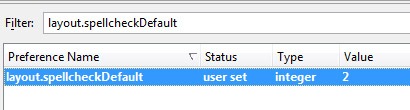
The default value of this parameter is 1. Double click on this parameter and change the value to 2. Close config file and now open any page which has a textbox and check for wrong spelling (no restart required).
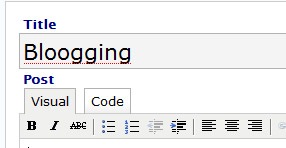
NB: In case the spell check is still not enabled, right click on the textbox and enable spell check.






😎
wow, that was helpful.
yo! that worked….. very useful….. thank you………..
Cool tip, it worked. I was looking for something like this.
You know Nirmal, all these years (say about 15) I am working with computers, I never touched spell check. But with what you are saying, I will sure look into it. Thanks,
Sangeeta
http://www.worldinurpocket.com
Cool tip man. The about:config is full of hidden wonders!
something that i was looking for before this. thanx. 😉
Great tip. I don’t know why they have decided one can make a typo only in text areas 😀
@HardGeek, @Tech pavan, @Ram
Glad that it was useful.
@Syahid,
Indeed its full of hidden tricks.
@Hanne,
Glad that you liked it.
Nice tip. Never knew about it. Thanks for sharing.
🙂
Thanks for helping me not look like an idiot!
Thanks so much.. I’ve been wondering about this for weeks 🙂
Thanks for the tip, I’m always finding the spell check function in Firefox to be useful and this extension to it will be even better as I tend to type straight into Firefox bypassing Word.
Hey Nirmal Great finding, i was desperately looking for this. I almost end doing spell mistake in writing title. Only one problem is that Firefox built in spell checker is not that much powerful is their is any way to improve this spell checker ??
I am having problems with Firefox 3 and Hotmail email – spellcheck? Any suggestions? thanks JM Australia
Thanks so much! That worked perfectly.
hi Everybody,
well for some extrange reason this is not working, 🙁 Im using the following Firefox version “Mozilla/5.0 (Windows; U; Windows NT 6.0; en-GB; rv:1.9.0.5) Gecko/2008120122 Firefox/3.0.5” and
layout.spellcheckDefault;2, look at my configuration at this image , any ideas please?
Thank you!
Oh the image is in this link http://fisa.myvnc.com/temp.jpg sorry
Firefox tiene su propio construido en el corrector ortográfico, pero el corrector ortográfico sólo está disponible en el área de texto y campos de texto (cuadros de texto
I know but it is not working, this firefox crap man!, I’ll quit using it, it’s a waste of time, try using IExplorer 7 plugins they’re better and don’t have to deal with stupid config files, and geek things, and I know what you are thinking, but let me tell you, my time is very important to waste it on a web browser, besides, all web the developers comply with IExplorer needs not Mozilla, even people say that W3C is ruled by Microsoft so why would you bother trying anything else?
Best Regards
Perfect tip! Thanks!
Thanks for the tip!
I might be a complete idiot here, but this spell check only seems to help with half the problem. Okay, so I type in an incorrectly spelled word, and this shows me that it’s incorrectly spelled, but then, I assume that when I right-click the word the context menu will show me a suggestion of the correctly spelled word, but for me it doesn’t. It simply shows that the word is misspelled, but it doesn’t give you a suggestion.
Am I seeing that correctly?
Can you suggest something that will not only tell me I’ve misspelled a word, but also give me a suggestion as to the correct spelling?
I found the solution! I’m using firefox 3.0.5 for mac 10.5.6, and I had installed the all-in-one gestures add on. This add on disabled the ability to see the correct spelling suggestions. On another forum a poster suggested using the mouse gestures add on instead of all-in-one gestures. I installed that instead, and I’m finally seeing correct spelling suggestions!
Yay!
I love firefox very well as i love my internet soul
@Hanne Sena, “I don’t know why they have decided one can make a typo only in text areas” – because in text areas people often type their name, address etc., which most of the time are not in the Firefox dictionary.
@ the IE user who said W3C is ruled by Microsoft: you are an idiot, sir.
@Dan Hey! I was the W3C ruled by microsoft guy, and I got to say that I was an idiot, actually I’ve been using firefox and I just love it, i’ve been able to do a lot of things with it, and sorry for the crap I said, I really retract that, I would delete my comment if I could. Regards
Thanks a lot for your trick.
TOTALLY AWESOME MAN!
Seems like more people could use spell check…
thank you, thank you, thank you – this site is fucking wonderful!
Thanx, great tip. Solved some of the problems with the spellcheck
Kind regards / nenne
Thank you, I was looking for this future long time ago.
Thanks Nirmal for your help man, this works a treat, I’m a very happy bunny now (*_*); I wish I was as intelligent as you 🙁
Please email me with any pointers about how you made your blog look this awesome, I’d be thankful!
Works perfectly, thanks for posting it!
I have a new laptop and after installing the Firefox I have noticed that I do not have spell check at all. Now after reading your article, not only I have spell check for text, but for any existing field. Great, thank you.
This still does not enable spell check for comment fields in Facebook. Any suggestions to fix this?
firefox spell checekr is really an awesome tool
Now the blogger have advanced options like a language change and others……..