

By default, Firefox is optimized for dial up connection. You can change the browser settings so that it can be used to browse with DSL or cable or other broadband links. In order to change the settings, first you need to edit config file. Type about:config in the address bar and press enter. Then enter network.http in the filter field and enter the following changes.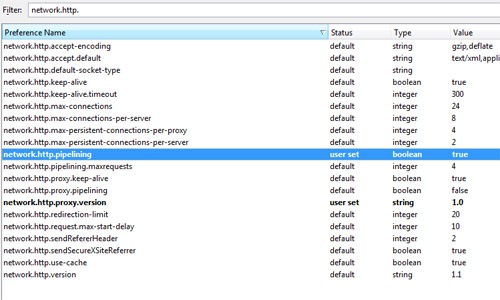
- Double click on ‘network.http.pipelining’ and set the value to true.
- Double click on network.http.pipelining.maxrequests’ and in the dialog box enter a higher value than the default value 4. 15 is an ideal value.
- Double click on ‘network.http.proxy.pipelining’ and set the value to true.
- Right click on the page and select New->Integer. Enter nglayout.initialpaint.delay and then click ok. Set the integer value of this to 0 and click ok.Now Firefox is optimized for broadband usage.






thanks Nirmal, appling now…
thanks nirmal really nice post
im trying it right now and will let you know about the results
and btw i m a new reader and i must say its an excellent blog
gj ….. just subscribed
Maybe firefox should ask for these settings when we install…then it would have been good…now most of the good features remain hidden…good that you pointed it out…
@Joel,
Right, many features are hidden in Firefox, common users may not know these.
@Hammad,
Thanks for the visit, glad that you liked my blog.
Long before I tried this technique to improve the browsing speed of Firefox. I read that somewhere. But I couldn’t notice any significant change in it. I am still not sure whether this actually works or not. Please correct me if I am wrong.
@Rakshit,
Well I’m not sure whether this will bring about a huge change, may be a small one.
@Rakshit: If you already have a good speed you might not notice. This can be useful for people like having a speed of less than 256 or who are on USB Wifi.
@Nirmal: What does the last option ment for ?
@Rakshit,
I have noted an increase in the speed of Firefox while loading the websites.
@Ashish,
The last option says how much time Firefox has to wait before rendering or loading the websites, generally its not set in config and so defaults to 250, setting it to 0 will start the rendering process immediately.
@Ashish
Yea, you may be right.I’ll try this out on my home internet connection which happens to be only 64kbps.
🙂
@Nirmal
It’s nice to hear that.
😀
I didnt find any difference. I may not be noticing.
Hey Nirmal,
thats a nice tip, ive done it, will test if it makes any difference.
im back after a 1 month break and ur was the first site i started checking, lots of me things to read, keep it up
Hi Nirmal,
Thanks for your tips..it seems to be a good tweak for firefox. If you have ny new tweaks to increase Broadband speed, please share with us.. Thanks man,Keep up the good work
Nirmal,
Thanks for the tip. It was recommended to my local Mac club, and more than one of our users reports better Firefox performance.
I read your tip “How To Back-Up Firefox Settings.” For Mac users, do you know what file is equivalent to the Windows Firefox settings file “prefs.js?” I don’t find a file with that name on my Mac (using Firefox v2.0.0.14).
Thanks a lot!
First, I am not a computer code writer. Just a guy that read your suggestion and passed it on to others in my Macintosh User Group
I was reading the article at http://kb.mozillazine.org/Nglayout.initialpaint.delay and was wondering why not set the value at “1” rather than “0”? Would the one millisecond give the program a breif moment to “catch its breath?”
Also, Mozilla suggests changing content.notify.interval too. http://kb.mozillazine.org/Content.notify.interval
What are your thoughts on this? What, if anything, would you set this for and why?
The network.http.pipelining.maxrequests only accepts values from 1 to 8 inclusive according to the Firefox wiki:
http://kb.mozillazine.org/Network.http.pipelining.maxrequests
Where did you get 15 from? Was this a value from FF2.0?
This worked for me. I used DRTCP before and after applying these changes via Firefox 3.0.10. There is no question that my download and upload speeds appear optimized via my DSL Modem after making these changes.
Thanks!
if you wanna optimize your internet performance, i suggest downloading dsl speed, it can boosts internet connection, thereby speeding up your computer
Works pretty fine. I am suffering this 4m couple of years. Now my problem has been solved. Tnx @Nirmal 🙂 for your wonderful trick.
Hello, I am using the new firefox 55 update and none of these options exist. Can we please get an update to this article for the latest version?