

Whenever you are writing long articles for your blog using Windows Live Writer, its necessary to save the drafts at regular intervals. Its irritating when your work disappears due to an unexpected error or crash. Windows Live Writer also can save articles automatically at regular intervals. This will prevent you from losing your important data, at least only the last few lines or so.
In order to activate this feature, Open Windows Live Writer, navigate to Tools -> Options, select Preferences and activate the “Automatically Save Drafts every” option and then change the interval to desired value in minutes. Click apply and start composing, all data will be automatically saved.
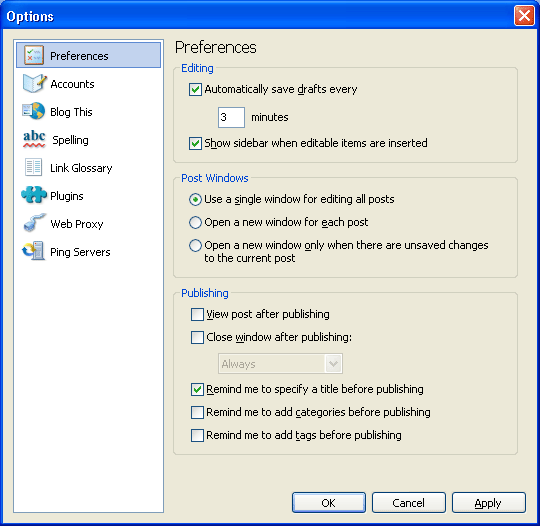
Next time you start composing posts in Windows Live Writer, it saves the drafts automatically.






Good to know because I am using the Live Writer for all my blogging needs now. It is way more convenient than WordPress integrated editor in my opinion.
Nice tip, and I had already enabled it – WLW does crash ocassionally, and losing a post isn’t exactly good.
I’d written about a fix for install/update problems for WLW’s latest versions, “How to Fix WLW install problems“.
I think time has come when i seriously need to look into this. I tried using windows live writer once , but the problem was while inserting videos , the code changes when I switch from visual editor to normal editor. I hope that problem is fixed now 😐 . Anyways autosave is really good and necessary. Once while writing a post online, my website went down but autosave saved my post. 😆
Cool, I had been looking forward to it. One more feature I want is advanced search to retrieve posts and pages, by default its just upto 500.
@Kanak: If you are going to use WLW check out my configuration tutorial on that.
Nice feature to have. This features supposed to be a default one.
@Syahid,
Its a default feature, but not enabled by default.